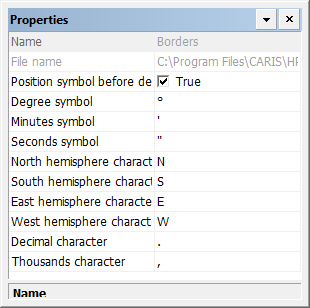
Properties that apply to all border templates.
Properties
Property | Description |
|---|---|
Name | The name of the layer. Read-only. |
File name | The name of the file that contains all border files. Read-only. |
Position symbol before decimal point | Control the position of the last unit symbol (degrees, minutes, or seconds) in the label. You must click on a border style to see the changes. True: The symbol is displayed immediately before the decimal point. False: The symbol is displayed immediately after the decimal point. |
Degree symbol | The symbol used to indicate degrees. Default is Type a new symbol or insert one from the character map. |
Minutes symbol | The symbol used to indicate degrees. Default is Type a new symbol or insert one from the character map. |
Seconds symbol | The symbol used to indicate degrees. Default is Type a new symbol or insert one from the character map. |
North hemisphere character | The character to represent the Northern hemisphere. Default is Type a new character. |
South hemisphere character | The character to represent the Southern hemisphere. Default is Type a new character. |
East hemisphere character | The character to represent the Eastern hemisphere. Default is Type a new character. |
West hemisphere character | The character to represent the Western hemisphere. Default is Type a new character. |
Decimal character | The character used to indicate a decimal point. Default is Type a new character. |
Thousands character | The character used to separate thousands. Default is Type a new character. |

