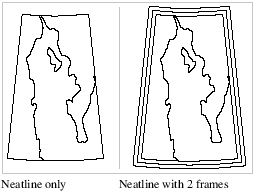
The neatline lies entirely within the picture frame and corresponds to the geographic coverage of a map or chart.
The neatline is always rectangular in a Mercator projection. In all other cases, the neatline is curved. The amount of curvature depends on the extent of the geographic area covered by the neatline, and on the projection being used.
Up to two additional neatline frames, parallel to the neatline, can surround the neatline itself.
The number of frames depends on the border style.
Properties

Property | Description |
|---|---|
Enable | True: Display neatline frames. False: Do not display neatline frames. |
Number of Neatline Frames | The number of neatline frames. Values can be: • 0: neatline only. • 1: neatline plus 1 neatline frame • 2: neatline plus 2 neatline frames. Type a value. |
Frame offsets 1 | The distance between the neatline and the outer neatline frame, in millimetres at map scale. Type a value. |
Frame offset 2 | The distance between the neatline and the middle neatline frame, in millimetres at map scale. Type a value. |
Line weight | The thickness of the line making up the neatline frames, in millimetres at map scale Type a value/ |
Line cap style | The end style of the lines. Styles are butt, projected, and round. Select from the list. |
Colour | The colour of the neatline frames. Click the button and choose a colour from the colour picker. |
Neatline area | The space between the data boundary and the neatline, represented as an area. This allows panel data to be displayed in a semi-transparent area beyond the neatline. True: The neatline area is displayed. The Neatline offset and Area colour properties become active. False: The neatline area is not displayed. |
Neatline offset | Offset from the neatline to the data boundary, in millimetres. Type a value. |
Area colour | Colour for the neatline area. Click the down-arrow and select a colour from the palette. The area will be filled with the selected colour. |