Scale bars enable a chart user to determine the relationship between distances on the map and distances on the ground.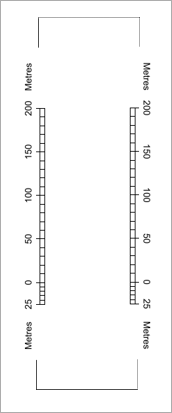
Scale bars enable a chart user to determine the relationship between distances on the map and distances on the ground.
Border scales are vertical scale bars located in the picture frame or between the picture frame and the neatline. They can be placed on one or both sides of the chart.
If you require horizontal scale bars or scale bars in other locations, see Scale Bars. If you wish, you can include both kinds of scale bars.
Properties
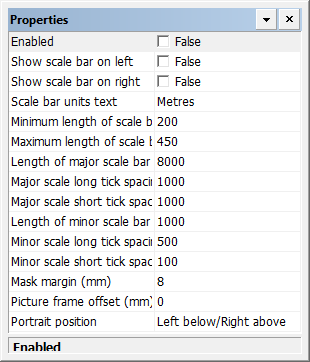
Property | Description |
|---|---|
Enabled | True: Display border scale bars. False: Do not display border scale bars. |
Show scale bar on left | True: A scale bar is placed on the left side of the border. False: No scale bar is placed on the left side of the border. |
Show scale bar on right | True: A scale bar is placed on the right side of the border. False: No scale bar is placed on the right side of the border. |
Scale bar units text | This text is placed at both ends of the scale bar to indicate the units. Type the appropriate value. Default is |
Minimum length of scale bar | The minimum length of the scale bar in millimetres at map scale. If you type an invalid value, a warning is displayed. Type a value. |
Maximum length of scale bar | The maximum length of the scale bar in millimetres at map scale. If you type an invalid value, a warning is displayed. Type a value. |
Length of major scale bar | The length of the major scale bar in metres. Type a value. |
Major scale long tick spacing | The spacing between long ticks on the major scale, in metres. Type a value. |
Major scale short tick spacing | The spacing between short ticks on the major scale, in metres. Type a value. |
Length of the minor scale bar | The length of the minor scale bar in metres. Type a value. |
Minor scale long tick spacing | The spacing between long ticks on the minor scale, in metres. Type a value. |
Minor scale short tick spacing | The spacing between short ticks on the minor scale, in metres. Type a value. |
Mask margin | A mask, or buffer, is used to hide the picture frame at both ends of the border scale. Set the length of this mask in millimetres at map scale. Type a value. |
Picture frame offset | The distance between the picture frame and the border, in millimetres at map scale: • 0 aligns the scale bar with the picture frame. • A positive value moves the scale bar outside the picture frame. • A negative value moves the scale bar inside the picture frame. |
Portrait position | In charts with a portrait orientation, border scale bars are positioned along the chart border so as to be clear of the chart fold. Select a position from the list. |