A picture frame is a rectangular box that surrounds the border components. Typically, the picture frame clearly sets off the border from surrounding information, such as legends. The picture frame is always rectangular, regardless of the projection.
Properties
Property | Description |
|---|---|
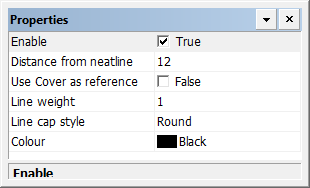
Enable | True: Display the picture frame. False: Do not display the picture frame. |
Distance from neatline | The distance of the border from the neatline. The minimum distance cannot be less than the length of any extended ticks. Specify a value in millimetres at map scale. |
Use cover as reference | True: Use the neatline corners to define the picture frame. False: Do not use the neatline corners to define the picture frame. |
Line weight | The thickness of the line making up the picture frame, in millimetres at map scale Type a value/ |
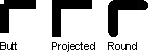
Line cap style | The end style of the line. Styles are butt, projected, and round. Select from the list. |
Colour | The colour of the picture frame. Click the button and choose a colour from the colour picker. |