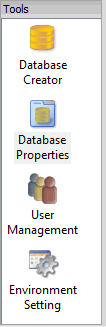
 The Tools window is located along the left side of the BDB Administration Tools.
The Tools window is located along the left side of the BDB Administration Tools.
This window contains five icons that provide access to the tools required to work with databases:
• Database Creator: create new databases. See Database Creator for details.
• Database Properties: select and set the properties for databases on the Node Manager to which you are connected. See Database Properties for details.
• User Management: modify the list of users, and the permission for each user. See User Management for details.
• Environment Setting: select and set the default paths and values for environment variables used by the application. See Environment Settings for details.