Tools |
|
Tools |
|
The Database Properties tool displays the properties of the database selected in the Available Databases list. The properties displayed include the run status, the name and location of the database, the available space on the drive containing the node location and the logging options.
You must be connected to a Node Manager in order to view the properties of a database. |
To view the properties of a database:
1. Double-click the Database Properties tool.
The Database Properties table is displayed in the main window.
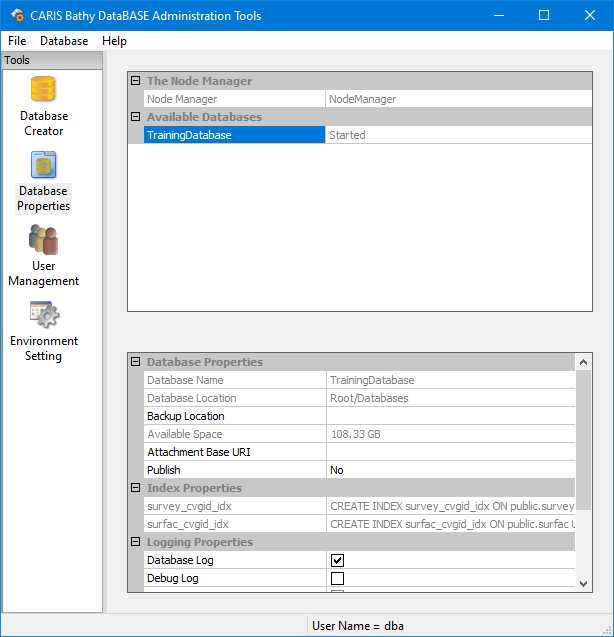
The currently connected Node Manager is displayed in the table, but cannot be changed in the current table view.
The Available Databases list identifies all of the databases that are registered in the Node Manager and accessible to users. To register an existing database from a node location, see Register a Database.
2. Select a database in the list.
You can only access the properties of a database if it is started. They also cannot be accessed from a client application unless started.
3. [Optional] If the database you want to view the properties of is Stopped, right-click the database and select Start from the pop-up menu.
The properties for the selected database are displayed.
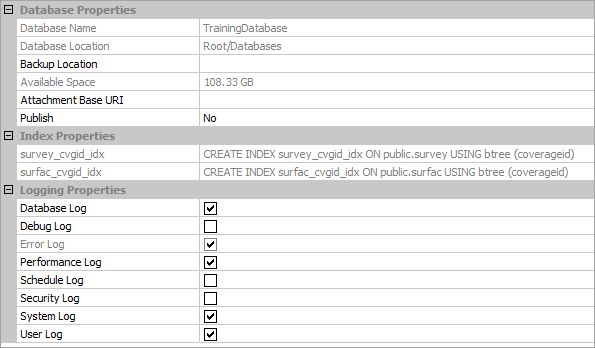
Database Properties
The Database Properties provide the following information about the selected database:
• Database Name: The name assigned to the database.
• Database Location: The node location being used to store and access the database.
• Backup Location: The node location being used to store backup files for the database.
• Available Space: The amount of disk space available on the drive that houses the node location of the database.
• Attachment Base URI: The base URI location for files attached to a database object in the current database, such as the name of the computer hosting the node manager. This value is populated manually and is included as a prefix in the Attached files attribute in BASE Editor. When a database object with attachments is selected in BASE Editor, the Attached files attribute displays the filenames of all attached files. When this property is populated, the user-specified text is added to the filename in the attribute value along with the Feature unique identifier value of the database object. When this property is not populated, only the filename of the attachment is displayed for the attribute.
• Publish: The configuration settings used to publish data from a BDB Server database to a CARIS Cloud service, if publishing is enabled. See Publishing a Database for more information on this property.
Some of these values are populated based on the selected database and are read-only.
Index Properties
The Index Properties provide a list of indexes that have been created for the selected database. Indexes can be created on columns in attribute tables to improve the performance of queries. See Create Index for information on indexes.
A number of indexes are created automatically on databases that have been upgraded from BDB Server 4.1 to 4.2. |
Logging Properties
The Logging Properties settings for the current database are listed in this section of the table. You can change the settings for any of the logs as follows:
• Unchecked: no log file is reported.
• Checked: logs are written to a text file found under the \Logs\ folder in each database directory. These files will be archived in a zip file format on a daily basis at 12:00 am.
4. [Optional] Select the log settings field(s) by clicking on the appropriate check box(es).
The selected log is updated with your changes.
