Menu | Database > Create Index |
Pop-up | Available Databases > selected database > Create Index |
Pop-up | Index Properties > Create Index |
Indexes can be created on columns in attribute tables to improve the performance of queries.
An index can be created on one or more columns in a table. Note that maintaining indexes adds overhead to a system because the index must be kept synchronized with the column. Therefore, it is wise to only add indexes where they will be used frequently in queries. Infrequently used indexes will add unnecessary overhead to a system.
An index can only be created on a database that is started. If the selected database is stopped, the Create Index command will not be enabled. See Start a Database for information on starting a database. The Catalogue Administrator role in the Administration Tools is required to create or delete an index.
Existing indexes are listed under the Index Properties section of the Database Properties when a database is selected. The index name will be displayed in the left column of the index properties and the right column will be populated based on the table and column for which the index was created. For example, using tables for coverage objects, something like the following could be created and displayed:
CREATE INDEX coverage_type ON coverage USING btree (coveragetype)
• coverage_type is the index name
• coverage is the selected table
• btree is the index type in a PostgreSQL RDBMS (this property is not present if using Oracle)
• (coveragetype) is the selected column
Indexes in the list can be deleted if they are no longer needed. |
It is possible that the list will include indexes that were not created in the Administration Tools. Such indexes will have been created manually in the database by a DBA. These indexes can be more complex in nature than those created with this command, which is only capable of creating simple indexes, and therefore cannot be recreated using this command.
Interface
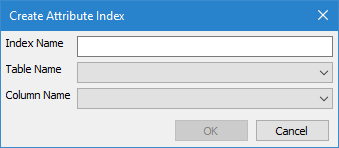
The Create Index command uses the following dialog box.
Option | Description |
|---|---|
Index Name | The name to assign to the index. This name must be unique and must meet specific naming restrictions. For details on the restrictions, see Naming Restrictions. |
Table Name | The attribute table that the index will be created for. This list is populated with all databsae object types defined in the catalogue for the database. |
Column Name | The column in the selected table for which the index will be created. The Column Name drop-down list is populated based on the selected Table Name. If the Table Name has not been selected, the Column Name drop-down list is blank. |
Procedure: Create an Index
To create an index:
1. Double-click the Database Properties icon.
2. In the list of available databases, select the database for which you want to create an index.
3. Select the Create Index command.
The Create Attribute Index dialog box is displayed.
4. Type a name in the Index Name field.
5. Select a Table Name for the index.
6. Select a Column name for the index.
7. Click OK.
Procedure: Delete an Index
To delete an index:
1. Double-click the Database Properties icon.
2. In the list of available databases, select the database that contains the index you want to delete.
3. In the Index Properties, right-click the index you want to delete.
4. Select the Delete Index command.
Pop-up | Index Properties > selected index > Delete Index |
A message is displayed asking you to confirm the deletion.
5. Click Yes to delete the index.
The index is removed from the Index Properties and deleted from the RDBMS.