Tools |
|
Tools |
|
The User Management tab is used to manage user account settings and access to databases. This involves creating and deleting user accounts, and assigning roles and permissions for those users. 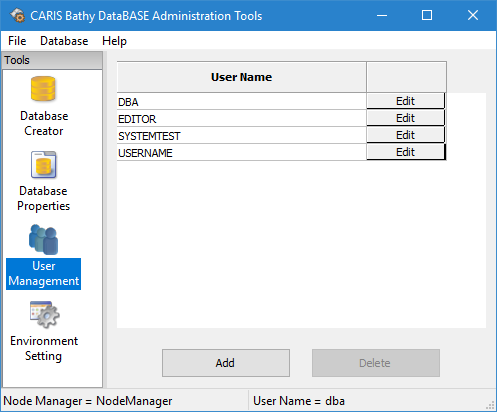
The User Management tab contains a table of all user accounts on the current node manager, as well as buttons to Add, Delete or Edit user accounts.
• The Add button launches the Create User Account dialog box, which is used to create new users. See Add/Edit a User Account for more information.
• The Delete button permanently removes the currently selected user account from the node manager. Deleting a user account cannot be undone, so exercise caution when using this tool. See Delete a User Account for more information.
• The Edit button, located beside each user account, launches the Edit User Account dialog box, which is populated with settings already defined for the selected user. These settings can be changed and committed to the node manager if the current user has the necessary node manager privileges. See Add/Edit a User Account for more information.
It is possible to have user accounts managed in a directory service, such as Lightweight Directory Access Protocol (LDAP) system or Active Directory (AD), rather than the RDBMS of the server. If this is the case, user accounts will be visible, but they cannot created or edited on this page. Clicking the Edit button will display the current settings for a user, but they cannot be changed. If you wish to make changes to user accounts when using an external directory service, all changes must be made in that external server and then synced with the RDBMS. This is done via the LDAP/AD User Import command. Refer to LDAP/AD User Import for information on this command. Once users are created in the RDBMS via a directory service, they will be validated by the external system anytime that a user attempts to connect to the server.
To use an external directory service, you must enable the option in the Server Setup Utility. See Configure a Connection to the Relational Database for information on this setting.
