Before creating databases, you need to consider where you will be storing them. Databases are stored in predefined locations called "node locations". When BDB Server is installed, a default Root node location is setup. This location saves databases to the installation directory:
C:\Program Files\CARIS\BDB Server\<version>
It is recommended that databases not be stored in the default location as they will be lost if the application is uninstalled. To store your databases in alternate locations, you must edit the node locations using the Bathy Node Location Editor.
The Bathy Node Location Editor is used to designate node locations for databases created for the selected Node Manager.
This editor is only available if both BDB Server and BDB Administration Tools are installed on the same computer. This tool is disabled if you are accessing the Node Manager remotely. |
The Bathy Node Location Editor modifies the configuration file "filesystemtable.bfs" which, by default, is installed in the C:\Program Files\CARIS\BDB Server\<version>\system folder. This location is typically restricted for read/write access to system administrators only. If the Windows® account that is being used to execute these functions does not have appropriate credentials, the filesystemtable.bfs file cannot be modified and the Node Location Editor functions will not complete successfully. Ensure that the account with which you are connected has the necessary permissions and ensure that the Server Setup Utility is started with the Run as Administrator option.
When selecting locations for nodes, keep in mind that some directories require special permissions for access. The default account used by the CARIS Bathy DataBASE Node Manager <version> service does not have the level of permissions required for this location. If you are planning on creating nodes in these locations, you will need to update the Log On properties of the Node Manager service to use an account with the appropriate permissions. For information on how to do this, see Configure the Node Manager Service.
You cannot run the Server Setup Utility while the Node Manager service is running. You can stop the service using the Windows Services tool (accessible from the Administrative Tools found in the Control Panel).
1. Make sure the CARIS Bathy DataBASE Node Manager <version> service is stopped.
2. Right-click the Server Setup Utility <version> command and choose Run as Administrator.
The Bathy DataBASE Server Setup utility is displayed.
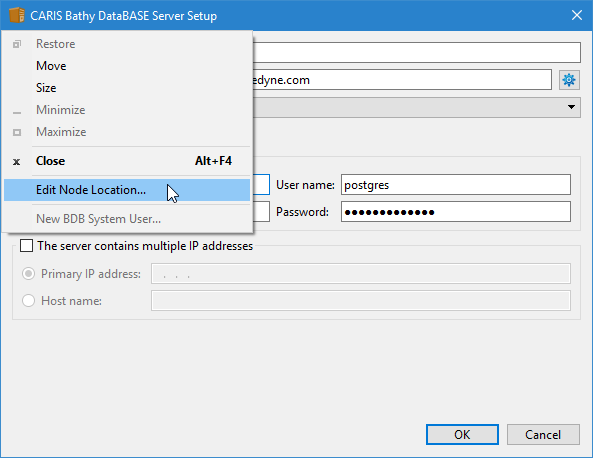
The Edit Node Location tool is available from the title bar pop‑up menu.
3. Click on the application icon (left-corner of the title bar).
The application pop-up menu is displayed.
4. Select the Edit Node Location command.
Pop-ups | Edit Node Locations |
If you have been assigned permissions to edit the node locations, the Bathy Node Location Editor is displayed. If not, an error message is displayed stating that you do not have the necessary permissions.
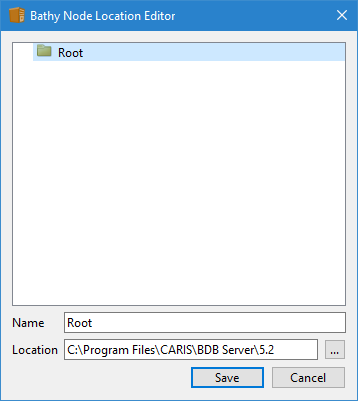
The node location structure is displayed in the dialog box. This structure comes from the filesystemtable.bfs file, located in the system folder for Bathy DataBASE Server. The file and folder used is specified by the FilesystemTable environment variable in the Environment Setting page. For more information on changing environment variables in the Administration Tools application, see Environment Settings.
By default, all databases are stored in the "Root" location. It is recommended that you create additional node locations, or change the Root location directory. You can add or remove node locations using the Editor. For information on how to perform these tasks, see: