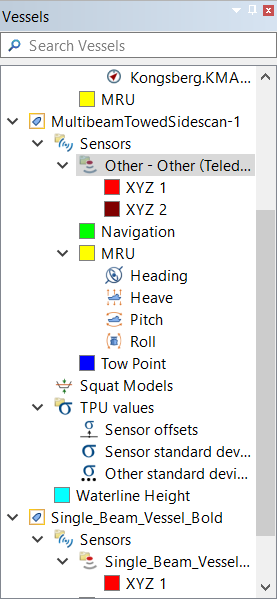
The Vessels window shows all of the vessels that are currently open in Vessel Editor. Each vessel appears as a tree, with its components (such as sensors and error models) appearing within it. Clicking on a vessel or component displays its information the Properties Window and Attributes Window and shows the vessel in the 3D Display.
The components listed in the Vessel Editor are initially determined by the sensor parameters you selected when creating the vessel file, but you can add or remove components after creating the vessel file (see Configure Components).
The source of the offsets and calibration values for the bathymetry sensor component (that is, the multibeam/single-beam sonar or laser scanner) depends on how the vessel file was created:
• If you created the vessel file in Vessel Editor with the File > New command, you will need to add the bathymetry sensor’s offsets and calibration values manually.
• If the vessel was created using the Create HIPS Vessel File from Data process, the process will take the offsets and calibration values from the track line information that was populated when the data was imported from the acquisition system. In this case, you should not need to change anything, unless the original raw data did not contain all the necessary offsets.
Some sensors can apply sound velocity correction (SVC) to their raw data during acquisition. This means all of the motions (heave, pitch and roll) and other offsets have already been applied to the depths. In this case, you can accept this SVC from acquisition, or you can have HIPS and SIPS apply its own SVC to the data.
The choice between SVC from acquisition and SVC from HIPS is made when you create the vessel file (see Other Settings) and cannot be changed afterwards. This is reflected in the vessel’s HIPS SVC Enabled property:
• HIPS SVC Enabled = True: You must apply SVC in the HIPS Georeference Bathymetry process for all data from this vessel.
• HIPS SVC Enabled = False: SVC cannot be used in HIPS and SIPS, so the SVC from acquisition will be used.
If your bathymetry sensor applies SVC during acquisition, you can setup the vessel in one of the following ways:
• Option 1: Create a new multibeam vessel file in the Vessel Editor, select one of the following options in the Other Settings page of the wizard, and then enter any required offsets in the vessel component afterward:
• Applying “Sound Velocity Correction” in HIPS and SIPS: Enter the required offsets in the vessel component.
• Using “Sound Velocity Correction” applied during acquisition: Leave the offsets at zero since they were applied already.
• Option 2: Create a new vessel file using the Create HIPS Vessel File from Data process. This always results in HIPS SVC Enabled being set to True.
• Option 3: Upgrade an HVF vessel file (used by versions of HIPS and SIPS before version 12) into the new VESSEL format. If the HVF file had an SVP section then the new VESSEL file will have its HIPS SVC Enabled property set to True. If the HVF file does not have an SVP section (which it should not if it was previously used for getting SVC from acquisition), then the VESSEL file will have its HIPS SVC Enabled property set to False.