If Clipping and Tiling components are included in a raster product template, they will be applied to all output formats generated by an export of that template. For example, if you export both a raster surface and a raster image using a template with the clipping and/or tiling components, the output for each format will be clipped and/or tiled.
Clipping
The Clipping component allows you to export only a portion of source data. The export portion is defined by specifying coordinates for the X and Y origin points in the surface and the width and height distances to include from those points. The units are controlled by the Distance settings in the Units category of Tools > Options.
Tiling
The Tiling component creates a separate raster for each tile in the surface. The tiles are determined based on user-specified width and height dimensions. These units are also controlled by the Distance settings in the Units category of Tools > Options.
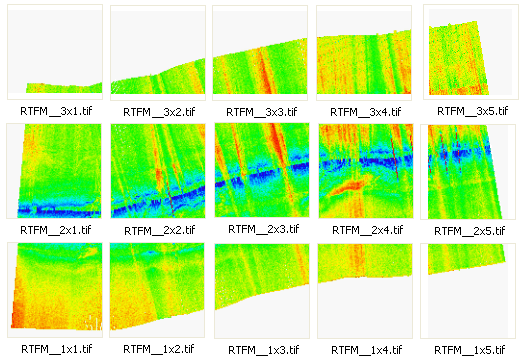
When creating a tile set, each file will be numbered according to the location of the tile in the surface. The tile number is in the format "RxC", where R and C are the row and column index of the tile. The tile number will be included in the file name for each tile, along with the Output name assigned for the export format. For example, If you were exporting a GeoTIFF image to tiles with RTFM set as the Output name, the resulting files would be numbered as follows:
You must specify a Unit Type for the Clipping and Tiling components. This controls the format that can be used when entering values for these properties. The same units should be used for both components. If data being exported with the product template does not use the same units, the export will not complete successfully
At least one raster format component must be included in a template when Clipping and Tiling are selected.