 CARIS HPD Paper Chart Editor
 CARIS HPD Paper Chart Editor
CARIS HPD Product Editor
CARIS HPD Source Editor
CARIS S-57 Composer
CARIS Paper Chart Composer
Pop-up | Edit Line > Redigitize (Display window) |
Replace a portion of an existing edge.
Related commands:
• • • • ' • • • • • • | • • • • • • • • • • |
Procedure
1. Select a feature.
2. [Optional] Select the Shared Edit command.
If this is active, all features that share geometry with the edited feature are changed.
3. Select the Edit Mode command.
The feature can now be edited.
Vertices are displayed as small yellow boxes and nodes as larger yellow boxes.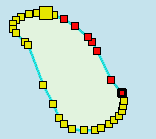
4. Select a range of vertices.
To select a range of vertices, press and hold <Shift> and click on two vertices. All vertices between the two will be selected. Selected vertices are red. |
5. Select the Redigitize Edges command.
The selected vertices are removed, which results in a straight line being drawn between the first and last vertex. You now add vertices to this line to redefine its shape.
6. Select any of the digitizing tools.
One vertex is highlighted by a black border. You must start digitizing at this vertex and move towards the other end of the line segment.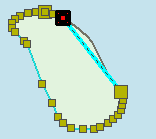
7. Redigitize the line starting at the highlighted vertex.
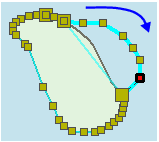
At any time while digitizing, you can change the digitizing tool or exit by pressing <Ctrl+Z>.
8. Continue adding vertices as needed.
9. Press <Enter> to finish redigitizing.
The shape of the edge is changed.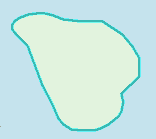
Changes are listed in the Output window.