 CARIS HPD Paper Chart Editor
 CARIS HPD Paper Chart Editor
CARIS HPD Product Editor
CARIS HPD Source Editor
CARIS S-57 Composer
CARIS Paper Chart Composer
Move a point feature or a vertex in a line or area boundary using the Display window or the Coordinates window.
Related commands:
• • • • • • | • • • • • |
Procedure: Display window
1. Select the feature.
2. Select the Edit Mode command.
A yellow square marks the position of the feature.
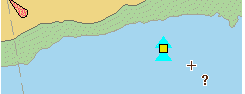
3. Move the cursor over the feature.
If you are editing a line or an area boundary, move the cursor over the vertex of interest.
The cursor changes (  ) when you are over the yellow square.
4. Click once.
The yellow square turns red.
5. Press and hold the mouse button and drag the feature or vertex to a new location.
6. Release the mouse button.
Procedure: Coordinates window
1. Select the feature.
2. Select the Edit Mode command.
The feature is listed in the Coordinates window.
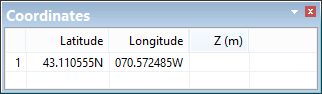
3. Double-click on the coordinate you want to change.
4. Edit the existing value or type a new value.
5. Press <Enter> or click in another cell.
The coordinate value is changed and the point or vertex is moved.
6. If necessary, repeat to change other coordinate value.