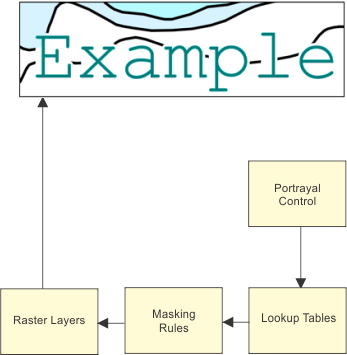
Raster dynamic masking combines colour tokens in lookup tables with masking rules to automatically apply masking. The colour tokens represent colour planes onto which masking is applied.
Raster dynamic masking can be applied by using a portrayal that support dynamic masking (i.e. INT1-v2.0).
The portrayal control file points to masking rules file. Masking rules are applied with each refresh of the chart.
This demonstrates the relationship between lookup tables, the masking rules file, raster layers and portrayal control file.
Portrayal Control
The lookup tables and the masking rule file that apply raster dynamic masking are listed in the INT1-v2.0 section of the portrayal control file (portrayalcontrol.xml). See text highlighted in red.
]Lookup table
<PresentationOptions Type="Paper" Name="INT1-v2.0" Description="INT1 - Dynamic masking"> <LookupTables> <AreaLookup File="%PCEConfig%\lookup\asymrefs.dic" /> <LineLookup File="%PCEConfig%\lookup\lsymrefs.dic" /> <PointLookup File="%PCEConfig%\lookup\psymrefs.dic" /> <TextLookup File="%PCEConfig%\lookup\tsymrefs.dic" /> </LookupTables> <MasterFile File="%uslXmaster%" /> <SymbolFile File="%uslXsymbol_5%" /> <ColourFile File="%PCEConfig%\ih_colour.xml" /> <FeatureCodeColourMapFile File="%PCEConfig%\fcmap.txt" /> <SymbolOrientation>NorthUp</SymbolOrientation> <MaskingRulesFile File="%PCEConfig%\maskingrules.xml" /> <RasterLayersFile File="%PCEConfig%\rasterlayers.txt" /> <Annotations> <AnnotationControlFile File="%PCEConfig%\..\annotationcontrol.xml" /> <AnnotationRules Id="Annotations" /> </Annotations> <PatternFile File="%PCEConfig%\Annotations\pattern_definitions.xml" /> </PresentationOptions> |
<PresentationOptions Type="Paper" Name="INT1-v2.0" Description="INT1 - Dynamic masking"> <LookupTables> <AreaLookup File="%PCEConfig%\lookup\asymrefs.dic" /> <LineLookup File="%PCEConfig%\lookup\lsymrefs.dic" /> <PointLookup File="%PCEConfig%\lookup\psymrefs.dic" /> <TextLookup File="%PCEConfig%\lookup\tsymrefs.dic" /> </LookupTables> <MasterFile File="%uslXmaster%" /> <SymbolFile File="%uslXsymbol_5%" /> <ColourFile File="%PCEConfig%\ih_colour.xml" /> <FeatureCodeColourMapFile File="%PCEConfig%\fcmap.txt" /> <MaskingRulesFile File="%PCEConfig%\maskingrules.xml" /> <RasterLayersFile File="%PCEConfig%\rasterlayers.txt" /> <Annotations> <AnnotationControlFile File="%PCEConfig%\..\annotationcontrol.xml" /> <AnnotationRules Id="Annotations" /> </Annotations> </PresentationOptions> |
A masking rule is listed along with the feature in the lookup table. If the portrayal supports raster dynamic masking and the masking rule file contains the rule, then dynamic masking is applied to the feature according to the rule.
For example, the "10Mask_Black_and_BathyContours_Fill" masking rule is applied to the $text feature listed in the text lookup table (tsymrefs.dic). See below.
"$text","","","8","S","DISPLAYBASE", "21010", "10Mask_Black_and_BathyContours_Fill" |
Masking rule
The masking rules file (maskingrules.xml) contains parameters for that rule. This is an extract of the masking rules file.
<cmr:Rule Name="10Mask_Black_and_BathyContours_Fill"> <cmr:Masking> <cmr:Style>fill</cmr:Style> <cmr:Width uom="mm">0.10</cmr:Width> <cmr:Target> <cmr:Token>Bathymetric_Contour</cmr:Token> <cmr:Token>Black</cmr:Token> </cmr:Target> </cmr:Masking> </cmr:Rule> |
Colour layering
Dynamic masking uses the raster layers file (rasterlayers.txt) to determine the order in which colours for both raster and vector charts are drawn. (For more information about this file, see Raster Chart Layers) The colour order can affect how dynamic masking is applied. The rasterlayers.txt file is shown below.
BUFF Land_Area |
HBLU Depth_Area_Med_Shallow |
FBLU Depth_Area_Shallow |
DRYG Intertidal_Area |
TOWN Built_Up_Area |
ROAD Grey_20p |
TRAF Traffic_Separation_Magenta |
GAID Green |
YAID Yellow |
RAID Red |
BLUE Blue |
BATY Bathymetric_Contour |
AIDS Nautical_Purple |
BLPN Black |
The left column lists colour tokens; the right column lists the associated colours. All colours in this file must be recorded in the colour map file, ih_colour.xml. For more information, see “Colour Map” on page 14.
For vector charts, all features are drawn to internal colour layers according to the order in rasterlayers.txt. Each feature is assigned to a layer based on colour.
For raster charts, raster layers are drawn according to the order set in the rasterlayers.txt file.
Layers are drawn in sequence starting from the top of the file.
For example, from the above file, features that use the BUFF colour token are drawn before features with the HBLU colour token. Features using the BLPN colour token are drawn last.
A “punch-out” capability ensures that features with a higher display priority are still visible when another layer is drawn on top. If a feature uses a colour that is not in rasterlayers.txt then the colour is drawn using the colour of the last layer in the list on top of all other features.