If the configuration of the vessel changes, you can add new attributes and give them time stamps to show when the changes became valid (see Component Time Stamps).
The procedure for adding new attributes to a component depends on whether the component has its time stamps synchronized with other components (the bathymetry sensor and TPU Values components and their child components) or whether their time stamps are independent (all other components).
If you accidentally create new time-stamped attributes in error, you can also delete them.
Adding attributes to synchronized components
The following components have their time stamps synchronized with other components:
• The Transmitter, Receiver, XYZ (transducer), and bathymetry sensor components are synchronized with each other.
• The Sensor Offsets, Sensor Standard Deviations, Other Standard Deviations, and TPU Values components are synchronized with each other.
To add new attributes to a synchronized set of components:
1. Select either the bathymetry sensor or TPU Values component in the Vessels window:
• If you want to add attributes to the bathymetry sensor, Transmitter, Receiver, or XYZ component, select the bathymetry sensor component.
• If you want to add attributes to the TPU Values, Sensor Offsets, Sensor Standard Deviations, or Other Standard Deviations components, select the TPU Values component.
2. In the Attributes window, scroll down the table until an empty row appears.
3. Enter the time when the new attributes become valid into the Date and Time fields of the empty row.
When you click on these fields, they take up the current date and time by default, but you can edit these values.
4. Enter the desired attributes into the other fields of the empty row.
5. Select one of the child components of the bathymetry sensor/TPU Values component.
6. In the Attributes window, scroll down the table until a row containing the new Date and Time values appears.
7. Enter the desired attributes into the fields of the row with the new Date and Time values.
8. Repeat steps 5 to 7 for each child component of the bathymetry sensor/TPU Values component.
9. Save the vessel file.
Adding attributes to independent components
The following components have independent time stamps that are not synchronized to other components: Navigation, MRU, Heading, Heave, Pitch, Roll, Gyro, Tow Point, Squat Models, and Waterline Height.
To add new attributes to a component with independent time stamps:
1. Select the component in the Vessels window.
2. In the Attributes window, scroll down the table until an empty row appears.
3. Enter the time when the new attributes become valid into the Date and Time fields of the empty row.
4. Enter desired attributes for this component into the other fields of the empty row.
5. Save the vessel file.
Deleting attributes
When you add new attributes to a component, it is not necessary to delete the old attributes. HIPS and SIPS will automatically compare the time of the survey against the time stamps of the attributes and use the proper attributes. In fact, if you delete the old attributes, you will not be able to re-process any survey data older than the oldest entry in the vessel file because there will be no time stamps for the survey data to use.
However, if you accidentally add a new set of attributes that are entirely invalid for the instrument, you can delete them:
1. In the Vessels window, select the component from which you want to delete attributes.
If you delete attributes on a component that is synchronized with other components, the attributes will be deleted in the other components too. For example, if you delete a row of attributes from the Sensor Offsets component, then the row will also be deleted from the TPU Values, Sensor Standard Deviations, and Other Standard Deviations components. |
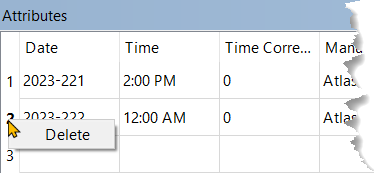
2. In the Attributes window, right-click on the row number of the attributes that you want to delete.
3. Select Delete.
The row of attributes is deleted from the component.