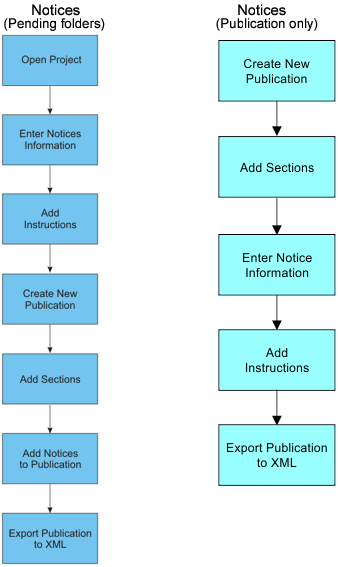
Publications Module can be used for the following notice publications:
• Chart notice
• Sailing direction notice
• Radio services notice
• General notice
• Catalogue notice
• Light notice
Notices can be stored in Publications Module in two locations:
• Draft notices can be stored in Pending folders and later assigned to a publication.
• Notices can be created directly in a publication as publication sections.
Information for notice instructions can be entered individually or captured from HPD paper charts. The chart must belong to the same schema as the publication.
If your publication will contain data from a paper chart – open the chart in Paper Chart Editor while assembling the notices.
You can enter notice information manually or you can capture information stored in HPD. If you enter information manually, you will not have access to commands that capture information from HPD. |
Additional formatting and layout may be required to produce the finished document. The XML output can be transformed to HTML using XSLT. Other third-party tools (XSL-FO, Word, Adobe) can be used to create the finished product.
Examples of workflows for notices.
Related commands
• • • • • • • • • • • | • • • • • • • • • • • |