 CARIS HPD Publications Module
 CARIS HPD Publications Module
Menu | View > History |
Tool |
|
Pop-up | History (Object Browser) |
View changes on a publication component. This command lists all previous versions of the selected component where changes were saved.
When this command is run, a Previous Versions folder is created in the Object Browser. This folder lists all the previous versions by time stamp in the format: yyyymmdd hh:mm:ss. An example is shown below.
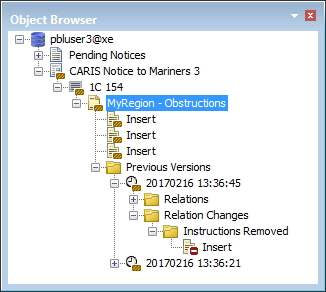
The History command is run on a chart notice (MyLocation:Obstructions). There have been two version of this notice since it was created. The most recent version is on top.
If a component contains other components (e.g. a chart notice with instructions), two folders are created inside the Previous Versions folder:
• Relations shows the components of the selected layer when History command was applied. In the above example, the chart notice has five instructions.
• Relation Changes shows changes that occurred to relations for the component since the last time the History command was used. In the above case, an instruction was removed.
If the component is without a relation, for example, an instruction then the previous versions of component are listed.

The History command is used in conjunction with other commands. See the Related Commands table.
Related commands:
• • | • • |
Procedure
1. Select a publication component.
2. Select the History command.
3. Select a version.
A read-only Properties window shows all attributes at the time of the change.
