Tool | CZMIL > 05 - Convert Camera Images from raw format to format |
The Convert Camera Images from Raw process converts camera images captured during a survey from PhaseOne IIQ raw format to a common image format. The output formats available are JPEG, TIFF and PNG, with JPEG being the default. These images can then be used as references in the Image Preview window when editing CZMIL data in Subset Editor. See CZMIL Data in Subset Editor for more information on the Image Preview functionality.
CARIS Batch process: Convert CZMIL Camera Images
Interface
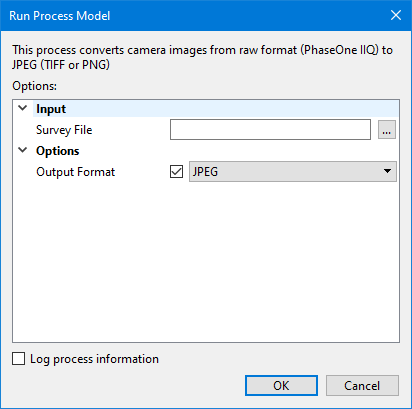
The options in this process model include:
Option | Description |
|---|---|
Survey File | The name and location of the survey file containing the survey lines of CZMIL data. If a survey file is open in the application, a drop-down list is also provided for this option. The drop-down list allows a survey layer open in the application or the current selection (if a survey line is selected) to be used as the input survey. 1. Click the browse button (...) to launch an Open file dialog box. 2. Navigate to the relevant file. 3. Click Open. |
Output Format | The output format for the converted images. If this option is not specified, the images will be converted to JPEG by default. |
Log process information | Create a log file containing the options specified when the process was run. The location of the log file is determined by the Logs setting in Tools > Options > Files and Folders. 1. Click the check box to enable this option. |
Procedure
1. Double-click the Convert Camera Images process model in the Tools window.
The Run Process Model dialog box is displayed, populated with the Convert Camera Images process model.
2. Navigate to the relevant Survey File.
3. Select the desired Output Format.
4. Click OK.
A progress dialog box is displayed providing progress information as the images are converted. Similar information is also reported in the Output window.