Extended, full and half ticks can be inserted into the graduated line.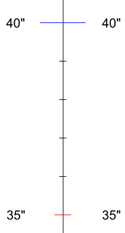
Extended, full and half ticks can be inserted into the graduated line.
Full ticks are positioned between extended ticks. Half ticks are positioned between full ticks. All ticks are displayed along a baseline.
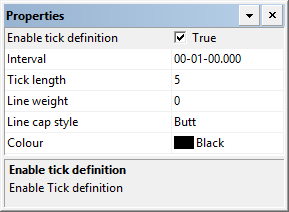
All three kinds of ticks have the same properties.
Properties
Property | Description |
|---|---|
Enable tick definition | True: Display the selected tick type. False: Do not display the selected tick type. |
Interval | The spacing used to display the graduated subsidiary line ticks. Type an interval. |
Tick length | The length of a tick in millimetres at map scale. Type a value. |
Line weight | The thickness of the ticks in millimetres at map scale. Type a value. |
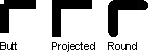
Line cap style | The style of the tick ends. Choose from Butt, Projected, and Round |
Colour | The colour for the ticks. Click the button and choose a colour from the colour picker. |
 .
.