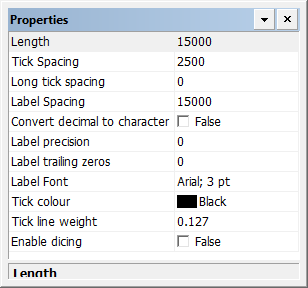
Define the major and minor scale bars.
Properties
Property | Description |
|---|---|
Length | Length of the scale bar in millimetres at map scale. Set to zero if you do not want to include this scale bar. Type a value. |
Tick spacing | The space between short ticks in millimetres at map scale. Type a value. |
Long tick spacing | The space between long ticks in millimetres at map scale. Type a value. |
Label spacing | The space between tick labels n millimetres at map scale. This is usually the same as the long tick spacing. Type a value. |
Convert decimal to fraction | True: Convert values from decimal to fractional. False: Display values as decimal. |
Font | The font used for the label. Click browse (...) and select font settings from a font dialog box. |
Tick colour | The colour for the ticks. Click the button and choose a colour from the colour picker. |
Tick line weight | The thickness of the tick marks in millimetres at map scale. Type a value. |
Enable dicing | True: Display dicing. You must specify a dicing pattern on the Scale Bar Templates layer. False: Do not display dicing. |