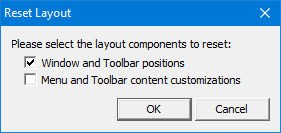
Menu | Window > Layouts > Reset Layout |
Reset the interface layout to its original appearance.
Related commands:
• • | • • |
Interface
Option | Description |
|---|---|
Window and Toolbar positions | On: Reset the windows and toolbars to the their original positions and sizes. Off: Leave the windows and toolbars in their current state. |
Menu and Toolbar content customizations | On: Remove toolbar and menu customizations. Off: Do not remove toolbar and menu customizations. |
Procedure
1. Select the Reset Layout command.
The Reset Layout dialog box is displayed.
2. Select any necessary options.
3. Click OK.