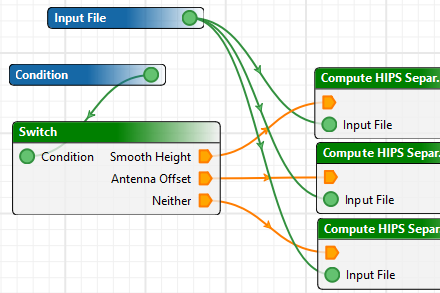
The Switch tool is a conditional tool that splits an output path based on whether the input enumeration matches one of multiple cases. This is useful for creating conditional processes that are more complex than the Branch tool can handle.
For example, you might want a process model that can perform the same task in three slightly different ways. Instead of creating three separate models, you can use a Switch with a parameter as input and define three different output paths based on that parameter. Before running the model, the user can set the parameter to activate whichever path they want to use.
After creating a Switch tool in the display window, you can set up the cases in the Properties window. An orange pentagon appears in the output of the Switch tool for each case you create, similar to the True and False pentagons in the Branch tool. You can connect each pentagon to the process that you want it to trigger if the input matches the case.
When you run the process model, any inputs that rely on the unselected cases are disabled so that you do not need to set them.