Previous versions of HIPS and SIPS used the HVF (HIPS Vessel File) format instead of the VESSEL format. HIPS and SIPS can still use HVF files during processing. However, if you want to view or edit a HVF file in Vessel Editor, it must be upgraded to the VESSEL format first.
You can upgrade the HVF file in HIPS or in Vessel Editor. If the HVF file has a complex configuration with multiple SVP sections, then using HIPS is recommended because it is better at identifying such configurations.
Upgrade HVF in HIPS
To upgrade an HVF file to the VESSEL format using HIPS:
1. Open HIPS.
2. Open a HIPS project that contains data collected by the HVF file.
3. In the Projects window, right-click on the vessel file and select Upgrade.
HIPS attempts to determine the vessel’s configuration automatically.
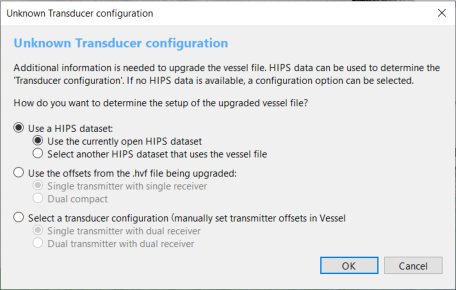
• If HIPS cannot determine the configuration, it displays the Unknown Transducer Configuration window. Go to step 4.
• If HIPS can determine the configuration, it upgrades the new vessel file and does not display the Unknown Transducer Configuration window. Go to step 6.
4. Select one of the options for determining the configuration:
• Use a HIPS Dataset: Attempts to determine the configuration based on a HIPS dataset that uses the given HVF file. Select the dataset that you want to use:
• Use the Currently Open HIPS Dataset: HIPS determines the configuration based on the currently open dataset.
• Select Another HIPS Dataset that uses the Vessel File: HIPS determines the configuration based on another dataset that uses the given HVF file. When you click OK, a navigation window opens for you to select this dataset.
If you select one of the options above, HIPS will search the given HIPS dataset and identify which of its track lines use the HVF file. Then, it will inspect the InstallationParmeters.xml files for those track lines and use their information to determine the configuration.
• Use the Offsets from the HVF File Being Upgraded: HIPS attempts to determine the configuration based on the HVF file itself. Select the basic configuration of the HVF file from the following list:
• Single Transmitter with Single Receiver: The sonar has one transmitter and one receiver, both in separate housings.
• Dual Compact: The sonar has two transmitters and two receivers. These are contained in two housings, each of which has one transmitter and one receiver.
• Select a Transducer Configuration: Manually select the configuration from the following options:
• Single Transmitter with Dual Receiver: The sonar one transmitter and two receivers, all in separate housings.
• Dual Transmitter with Dual Receiver: The sonar two transmitters and two receivers, all in separate housings.
5. Click OK.
HIPS converts the HVF file. If you selected the option to use another HIPS dataset to determine the configuration, HIPS first opens a navigation dialog for you to select the dataset.
6. Select Save to save the project.
The vessel file is now upgraded to the VESSEL format. In addition, the project that is open in HIPS is changed so that it uses the VESSEL file instead of the HVF file.
The HVF file is not changed or deleted. Any other existing HIPS projects that used the HVF file will continue to be linked to it. HIPS can still read and use HVF files, so it is not normally necessary to link the other HIPS projects to the new VESSEL file.
Upgrade HVF in Vessel Editor
This process upgrades an HVF file to the new VESSEL format using Vessel Editor. This does not alter or delete the HVF file, it simply creates an upgraded copy of it with the VESSEL file extension.
1. Open Vessel Editor.
2. Select Open.
3. Navigate to the HVF file that you want to upgrade and select it.
Vessel Editor attempts to determine the vessel’s configuration automatically.
• If Vessel Editor cannot determine the configuration, it displays the Unknown Transducer Configuration window. Go to step 4.
• If Vessel Editor can determine the configuration, it loads the new vessel file and does not display the Unknown Transducer Configuration window. Go to step 6.
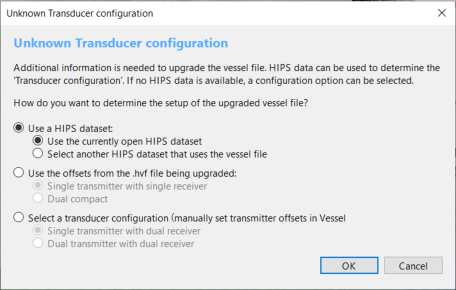
4. Select one of the options for determining the configuration:
• Use a HIPS Dataset: Attempts to determine the configuration based on a HIPS dataset that uses the given HVF file.
• Use the Currently Open HIPS Dataset: This option is only available when the upgrade is started in HIPS.
• Select Another HIPS Dataset that uses the Vessel File: Vessel Editor determines the configuration based on another dataset that uses the given HVF file. When you click OK, a navigation window opens for you to select this dataset.
If you select the option above, Vessel Editor will search the given HIPS dataset and identify which of its track lines use the HVF file. Then, it will inspect the InstallationParmeters.xml files for those track lines and use their information to determine the configuration.
• Use the Offsets from the HVF File Being Upgraded: Vessel Editor attempts to determine the configuration based on the HVF file itself.
• Single Transmitter with Single Receiver: The sonar has one transmitter and one receiver, both in separate housings.
• Dual Compact: The sonar has two transmitters and two receivers. These are contained in two housings, each of which has one transmitter and one receiver.
• Select a Transducer Configuration: Manually select the configuration from the following options:
• Single Transmitter with Dual Receiver: The sonar one transmitter and two receivers, all in separate housings.
• Dual Transmitter with Dual Receiver: The sonar two transmitters and two receivers, all in separate housings.
5. Click OK.
Vessel Editor opens the HVF file and upgrades it to the VESSEL format. If you selected the option to use a HIPS dataset to determine the configuration, Vessel Editor first opens a navigation dialog for you to select the dataset.
6. Select Save to save the vessel file as a VESSEL file.
The vessel file is now upgraded to the VESSEL format.
The HVF file is not changed or deleted. Any existing HIPS projects that used the HVF file will continue to be linked to it. HIPS can still read and use HVF files, so it is not normally necessary to link the existing HIPS projects to the new VESSEL file.