 CARIS HPD Paper Chart Editor
 CARIS HPD Paper Chart Editor
CARIS Paper Chart Composer
Menu | File > Export > Sheet > PostScript |
Write the current chart to a PostScript file that can be spooled to a local PostScript printer or used to create a PDF file.
Two export formats are available based on masking options:
• no dynamic masking, use PS-Adobe-2.0
• with dynamic masking, use PS-Adobe-3.0 EPSF-3.0 (encapsulated PostScript)
A specific area can be exported by using the Export Area command.
Export to PostScript supports 1-bit, 8-bit, and 24-bit images only. |
Related commands:
• • • • • | • • • • • |
Interface
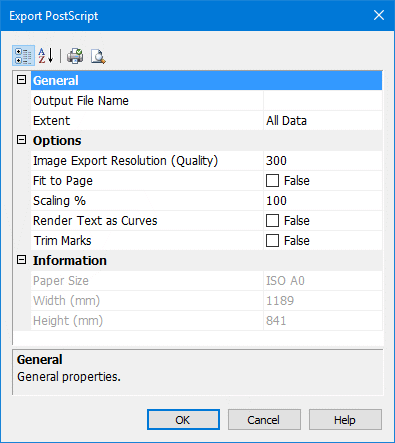
Properties | Description |
|---|---|
Output Name | Name of the PostScript file. Select an name by clicking Browse and choosing a folder and name for the PostScript file. |
Resolution | Image resolution for • an entire raster chart • any raster images associated with a vector chart (but not the chart itself). Type a DPI value in the field. |
Extent | The view area of the chart. This can be All Data, Current View or Export Area (if an export boundary has been created) The Current View option should be chosen if you are not sending the chart to a plotter. Select an extent from the list. |
Fit to page | Fit the chart to the selected paper size. If this option is selected, the Scaling option is unavailable. Click the check box to switch the value from False to True. |
Scaling | Print the chart as percentage of its original size Type a value. |
Render text as curves | Print text as vector curves instead of as pixels. This option is useful if the chart contains fonts that are not on your printer or plotter. Note: This option is not available for raster charts or charts with a dynamic masking portrayal. Click the check box to change the value from False to True. |
Trim Marks | Add trim marks to a sheet as guides to trimming oversized sheets. Click the check box to change the value from False to True. |
Procedure
1. Select the Sheet layer.
2. Select the Export Sheet to PostScript command.
The Export PostScript dialog box is displayed.
3. Define any necessary properties and click OK.
A progress bar appears.
To cancel the export at any time, select the Esc key and confirm your action by clicking Yes in the pop-up window.