Associated controls are a means to encode attribute values through dialog boxes. When an attribute does not have a control associated with it, a standard text dialog box is displayed.
Two conditions must be followed when applying associated controls:
• The control must match the attribute type. For example, the DateFormat control must be matched with an alphanumeric attribute. DateFormat can not be used with a list attribute.
• The control must be available in the catalogue. For example, transparencycontrol for INT1 cannot be set for an S-57 attribute.
To add an associated control:
1. Select Associated Control in the Attribute Classes branch.
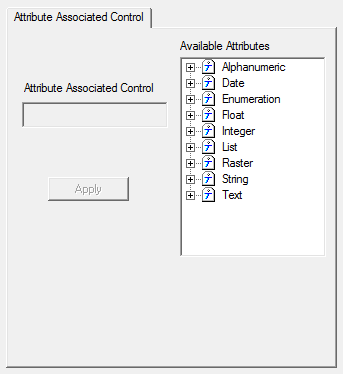
The Editor is refreshed to display the Attribute Associated Control tab.
2. Select an attribute in the Available Attributes list.
3. Type the associated control in the Attribute Associated Control field.
4. Click Apply.
Associated controls
The following tables describes associated controls and the attributes to which the controls are applied.
Date | |
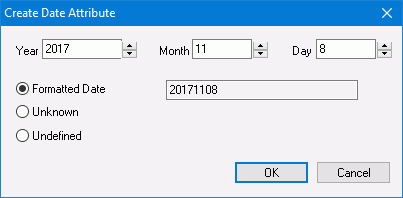
Control | DateFormat |
Attributes | Alphanumeric: CPDATE, DATEND, DATSTA, SORDAT, SUREND, SURSTA |
Description | DateFormat encodes a date attribute in the following formats: • CCYYMMDD • CCYYMM • CCYY. This control is best suited for features that are permanently fixed. For example, DATSTA and DATEND are used for permanently added or permanently removed buoys. |
Dialog box |
|
Periodic Date | |
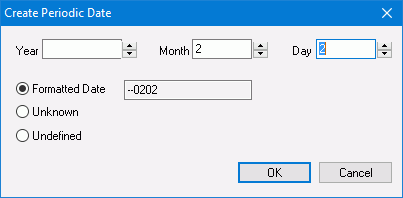
Control | PeriodicDate |
Attributes | Alphanumeric: PEREND, PERSTA |
Description |
• CCYYMMDD • CCYYMM • --MMDD • --MM This control is best suited for features that are active on a seasonal basis. For example, a buoy that is in place only during the summer. |
Dialog box |
|
Date and Time | |
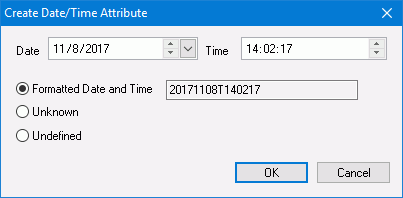
Control | DateTime |
Attributes | Alphanumeric: TIMEND, TIMSTA |
Description | DateTime encodes a date and time in the following format: CCYYMMDDThhmmss |
Dialog box |
|
Year | |
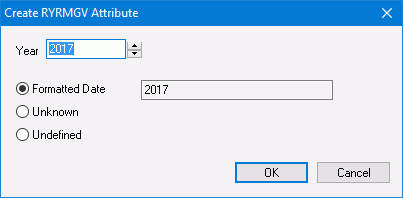
Control | YearFormat |
Attributes | Alphanumeric: RYRMGV |
Description | YearFormat encodes a year in the following format: CCYY This control is suitable for changes that occur an annual basis. For example, the calendar year for a magnetic variation in compass rose. |
Dialog box |
|
Source Indication | |
Control | SorindAttribute |
Attributes | Alphanumeric: SORIND |
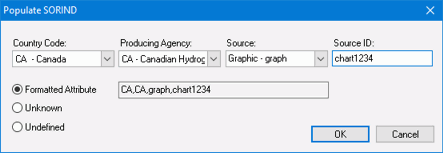
Description | The SORINDAttribute control encodes source information in the following format: CC,PA,ST,ID where • CC = country code (c2) • PA = producing agency (c2) • ST = source type (c5) • ID = source ID (c...) This control is suitable for indicating information on source materials. |
Dialog box |
|
Enumerated List | |
Control | EnumLevelList |
Attributes | List: NATQUA, NATSUR |
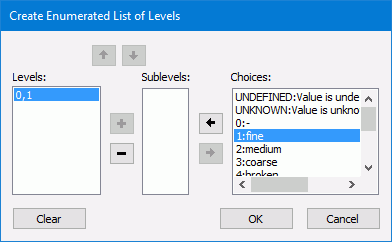
Description | The EnumLevelList control organizes enumerated lists in an order or hierarchy. |
Dialog box |
|
AML Comment | |
Control | AMLComment |
Attribute Type | Alphanumeric DSID Comment in AML header |
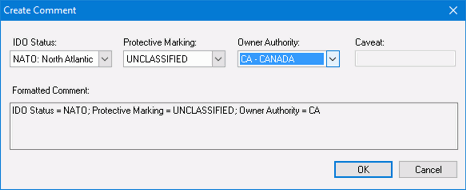
Description | The AMLComment encodes the following AML product information: • IDO Status: • 501 = NATO (North Atlantic Treaty Organization) • 502 = NACC (North Atlantic Co-operation Council • 503 = PfP (Partnership for Peace) • 504 = WEU (Western European Union) • Protective Marking • 501 = Cosmic Top Secret • 502 = Focal Top Secret • 503 = Top Secret • 504 = Secret • 505 = Confidential • 506 = Restricted • 507 = Unclassified • Owner Authority: The two-character NATO country code to denote the owner that is responsible for the protective marking. The code is derived from NATO STANAG 1059. |
Dialog box |
|
Transparency | |
Control | transparencycontrol |
Attribute Type | Integer: $tp |
Description | transparencycontrol sets a transparency value on images as a percentage. (0% not transparent to 100% completely transparent.). The value is set directly from the Attributes window when an image feature is selected. This attribute is only in the Paper Chart catalogue. |
Dialog box | No dialog box is associated with this control. |