You must have administrator privileges to modify HPD catalogues. |
Features and attributes are defined through catalogues.
A catalogue is composed of the following components:
• Dictionary that defines what features and attributes are available in a profile.
• Profile that defines links between features and attributes (including relationships and allowed primitives).
HPD source and product features are defined through database catalogues. Features in external and standalone files are defined though separate XML catalogues.
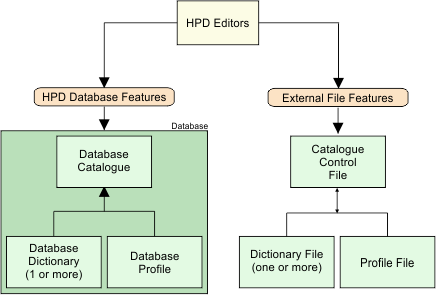
This shows the relationship between dictionary and profiles for both database and external files in HPD.
For more information on external catalogues, see Catalogues.
Each HPD editor has an associated catalogue:
Application | Dictionary | Profile |
|---|---|---|
Source Editor | hpdObjects aml21ExtensionObjects | • S-57 Source • S-57 3.1 • AML 1.0 • AML 2.1 • IENC 2.1 • IENC 2.2 • IENC 2.3 • LOS |
Product Editor | hpdObjects aml21ExtensionObjects | • S-57ENC • S-57 3.1 • AML 1.0 • AML 2.1 • CLB 2.1 • ESB 2.1 • LBO 2.1 • MFF 2.1 • RAL 2.1 • SBO 2.1 • IENC 2.1 • IENC 2.2 • IENC 2.3 • Paper Chart • Tiled Raster Products |
Paper Chart Editor | hpdObjects | • Paper Chart |
The source catalogues (dictionaries and profiles used by Source Editor and others) contain support for all products in the database. The product catalogues (dictionaries and profiles used by the Product Editor and Paper Chart Editor) contain support for specific product types.
All HPD products must be associated with a profile. Special user-defined profiles can be created – but the features in these profiles must be included in the dictionary. The dictionary can be edited through the Dictionary Editor in Administration Tools (see Dictionary Editor).
When an existing product profile is updated, the version number must be changed to the next highest version
Dictionaries can also be copied from a database to an XML file and imported into another database.