 CARIS HPD Source Editor
 CARIS HPD Source Editor
Tool |
|
Pop-up | Change Status (Markers window) |
Change the status of a marker.
Available only from the Markers window.
Related commands:
• • • • • • • • • | • • • • • • • • |
Interface
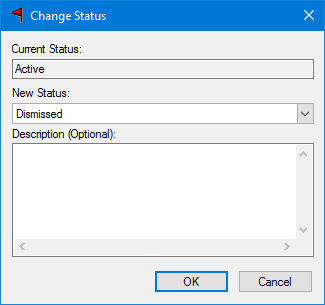
Information | Description |
|---|---|
Current Status | The current status of the selected marker. Read-only. |
New Status | The new status for the marker. Select from the list of valid status values. |
Description | Additional information. Type in the box. |
Procedure
1. Select a marker.
2. Select the Change Marker Status command.
The Change Status dialog box is displayed.
3. Select a new status.
4. [Optional] Type a description.
5. Click OK.
The status is changed and you are returned to the Markers window.
