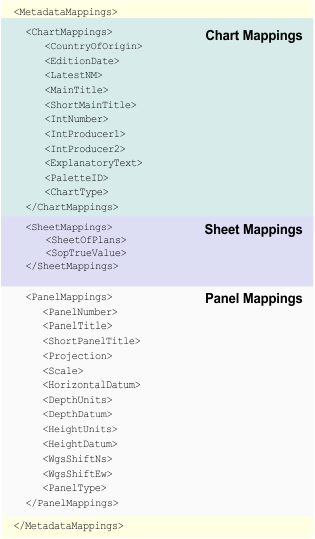
Chart metadata is mapped to HCRF during export using the caris2hcrf_metadata.xml file.
Custom attributes can also be used. For example, if the Chart Comments (CHTCOM) attribute is replaced with a custom attribute, that attribute can be recorded in the metadata file.
This is a graphical representation of the file structure.
The following table describes each element in the file including:
• if the attribute is a mandatory requirement for HCRF export
• the attribute in PCE to which the HCRF attribute is mapped
• if a custom attribute can be used in place of the PCE attribute
• any additional information or error messages
Element | Description |
|---|---|
| |
<CountryOfOrigin> | Alphanumeric value to identify the Country of Origin for the chart version. Mandatory: Yes Default chart attribute: PUBCON Example: Custom attribute allowed: No An error is reported if the value is not recorded in the caris2hcrf_countries.txt or if the translated value is not in COUNTRY.TAB |
<EditionDate> | Date value to identify the Edition Date. Mandatory: Yes Default chart attribute: EDDATE Example: Custom attribute allowed: No The date is written to HCRF in YYYYMMDD format. |
<ChartNumber> | Alphanumeric chart identifier. Mandatory: Yes Default chart attribute: CHTNUM Example: Custom attribute allowed: No An error is reported if the chart ID is greater than eight characters. |
<LatestNM> | Integer value for the latest Notice to Mariners on the image. Mandatory: No Default chart attribute: LTSTNM Example: Custom attribute allowed: No The value is NNNNN/YY. An empty value indicates a new edition. |
<MainTitle> | Alphanumeric value for main title. Mandatory: Yes Default chart attribute: CTITL1 Example: Custom attribute allowed: No Title can exceed a maximum of 100 characters (HCRF limit). If character length exceeds the limit, then When non-ASCII character are used for panel or chart titles, the string is written in long normalized form minus non-ASCII characters. |
<ShortMainTitle> | Alphanumeric value for main title Mandatory: Yes if Default chart attribute: STITL1 Example: Custom attribute allowed: Yes An error is reported if attribute is needed but not found. An error is reported if the When non-ASCII character are used for panel or chart titles, the string is written in long normalized form minus non-ASCII characters. |
<IntNumber> | Alphanumeric value for INT number Mandatory: No Default chart attribute: INTNUM Example: Custom attribute allowed: No An error is reported if the value is longer than five characters. |
<IntProducer1> | Alphanumeric value for the producer of the INT version Mandatory: Yes if Default chart attribute: INTPR1 Example: Custom attribute allowed: No Errors are reported for the following conditions: • if value is set but • if value is not set but • if value is set but not listed in • if value is set but translated value is not listed in COUNTRY.TAB |
<IntProducer2> | Alphanumeric value for producer of INT version (2) Mandatory: No Default chart attribute: INTPR2
Custom attribute allowed: No Errors are reported for the following conditions: • value is set but • value is not set but • value is set but not listed in • value is set but translated value is not listed in COUNTRY.TAB |
<ExplanatoryText> | Alphanumeric value for Explanatory Text Mandatory: No Default chart attribute: HCREXP Example: Custom attribute allowed: Yes Text is truncated to 500 characters. If the attribute does not have a value, text is copied from the An error message is reported if text is not printable. |
<PaletteId> | Enumerated value for PAL lookup table record. Mandatory: Yes Default chart attribute: HCRPAL Example Custom attribute allowed: Yes PCE uses the enumeration code as the palette ID. The value of the palette ID is also used when PCE looks for day dusk and night colour tokens files. The palette ID is written to the |
<ChartType> | Enumeration for chart type (not written to HCRF) Mandatory: Yes Default chart attribute: CHTYPE Example: Custom attribute allowed: No The attribute value is used to determine the relevant RCS from the rcsControl.xml |
| |
<SheetOfPlans> | Enumeration to determine if chart is a Sheet of Plans Mandatory: Yes Default chart attribute: TSHEET Example: Custom attribute allowed: No The attribute is not written to HCRF |
<SopTrueValue> | A value of “Harbour Plans” in TSHEET indicates that the chart is part of a sheet of plans. Example: |
| |
<PanelNumber> | Integer for Sub-Panel Number also used as Mandatory: Yes Default chart attribute: PANNUM Example: Custom attribute allowed: No Errors are reported for the following conditions: • values for panels are not unique • values do not form unbroken numerical sequence, starting at 0 if not sheet of plans, or 1 if sheet of plans • value is greater than 99 |
<PanelTitle> | Alphanumeric value for panel title Mandatory: Yes Default chart attribute: PANNAM Example: Custom attribute allowed: No If panel title exceeds 100 characters then |
<ShortPanelTitle> | Alphanumeric value for panel title. Mandatory: Yes if the panel name is greater than 100 characters. The panel name is truncated if necessary. Default chart attribute: SPNNAM Example: Custom attribute allowed: Yes Errors are reported for the following conditions: • attribute is required but not found • |
<Projection> | Alphanumeric value for Projection (parameters 1-4) Mandatory: Yes Default chart attribute: PRJCTN Example: Custom attribute allowed: No Errors are reported for the following conditions: • Value parsed from PRJCTN is in • Translated value not listed in PROJCODE.TAB |
<Scale> | Integer for Projection Scale Mandatory: Yes Default chart attribute: PSCALE Example: Custom attribute allowed: No |
<HorizontalDatum> | Alphanumeric value for Horizontal Datum Mandatory: Yes Default chart attribute: DATUM Example: Custom attribute allowed: No Errors are reported for the following conditions: • Value not found in caris2hcrf_horizontalDatums.txt • Translated horizontal datum code not found in HORDAT.TAB • Translated spheroid code not found in HcrfSpheroids.txt |
<DepthUnits> | Alphanumeric value for Depth Units Mandatory: Yes Default chart attribute: DEPUNT Example: Custom attribute allowed: No Errors are reported for the following conditions: • Value not found in caris2hcrf_verticalUnits.txt • Translated vertical units code not found in UNITS.TAB |
<DepthDatum> | Alphanumeric value for Depth Datum Mandatory: Yes Default chart attribute: DEPDAT Example: Custom attribute allowed: No Errors are reported for the following conditions: • Value not found in caris2hcrf_verticalDatums.txt • Translated vertical datum code not found in VERDAT.TAB |
<HeightUnits> | Alphanumeric value for Height Units Mandatory: Yes Default chart attribute: HGHTUN Example: Custom attribute allowed: No Errors are reported for the following conditions: • Value not found in • Translated vertical units code not found in UNITS.TAB |
<HeightDatum> | Alphanumeric value for Height Datum Mandatory: Yes Default chart attribute: HGHTDA Example: Custom attribute allowed: No Errors are reported for the following conditions: • Value not found in • Translated vertical datum code not found in VERDAT.TAB. |
<WgsShiftNs> | Numeric value for WGS84 shift data N/S in minutes Mandatory: Yes if the HCRF horizontal datum code is listed in wgs84Relationships.xml. Default chart attribute: SHFTNS Example: Custom attribute allowed: No Errors are reported for the following conditions: • Value translated from DATUM is considered equivalent to WGS-84 and the • Value translated from DATUM is considered • • • |
<WgsShiftEw> | Numeric value for WGS84 shift data E/W in minutes. Mandatory: Yes if the HCRF horizontal datum code is listed in Default chart attribute: SHFTEW. Example: Custom attribute allowed: No. Errors are reported for the following conditions: • • Value is not in range -99.99 to 99.99. |
<PanelType> | Enumerated value to determine whether or not to skip creation on Mandatory: Yes. Default chart attribute: PANTYP Example: Custom attribute allowed: No |