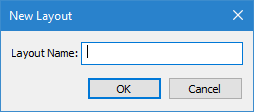
Menu | Window > Layouts > New Layout |
Save the current layout of windows and toolbars so that it can be reapplied later. This lets you create layouts for different tasks, eliminating the need to reposition the interface each time. The layout is saved to a new user interface layout file (.ui) in the AppData folder for the current user. The layout files in this folder control the list of layouts displayed in the Layouts menu and in the Layouts dialog box.
If the new layout is not needed in the Layouts list or dialog box, and is simply being saved to use with other applications or computers, the Export Layout command can be used instead.
Related commands:
• Layouts
Procedure
1. Set up all interface elements as you want them.
This includes the position and visibility of windows and toolbars.
2. Select the New Layout command.
The New Layout dialog box is displayed.
3. Type a name for the layout.
4. Click OK.