Menu | Edit > Edges > Conflate |
Merge edges on intersecting lines or areas. One line or area is fixed; edges on other lines or areas will be merged with the fixed feature if they fall within a defined tolerance. Only the fixed feature is selected.
Merged edges are automatically intersected with fixed edges. Start and end points are never conflated because they could affect the topology of other features.
The POSACC and QUAPOS attributes of merged edges are discarded during conflation.
This command works only on the active layer.
Related commands: Points Conflate
Procedure
1. Select an area or line.
If you select multiple features, a message is displayed and the edges will not be conflated.
2. Select the Conflate Edges command.
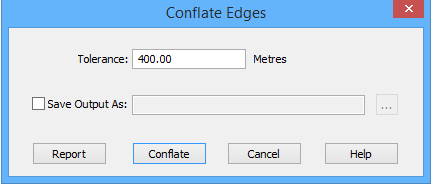
The Conflate Edges dialog box is displayed.
Option | Description |
|---|---|
Tolerance | Edges within this distance of the fixed feature will be conflated. Units are set in Options. 1. Type a value. |
Save Output as | On: The output will be saved to a file. Click browse (...) to select a file name and location. Off: No output report is saved. |
Report | Display a report in the Output window before any conflation is done. The edges are listed by feature object ID. See Report |
3. Type a value in the Tolerance field.
4. Set any other necessary options.
5. [Optional] Click Report.
6. Click Conflate.
The edges within the tolerance are conflated with the edges of the fixed feature. Results are shown in the Output window.
Report
You can see a report before running the command. A report tells you which edges will be conflated. The report is divided into three sections:
• Skipped edges
• Disconnected objects on other layers
• Objects to conflate
Reports are displayed in the Output window and can be saved.
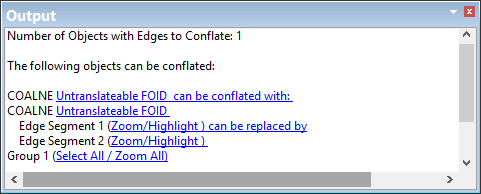
Click the hyperlinks to select the edges in the Display window. The Zoom hyperlink gives a closer view of the edge and the Highlight hyperlink selects the edge.
Example 1
This example uses two lines. The fixed line is shown in blue. The distance between the fixed line and the unselected line is 30 metres at one point and 40 metres at the other.
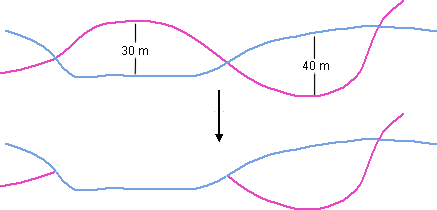
If the tolerance is 30 metres, the edge at 30 metres is merged with the fixed edge. The edge at 40 metres is not merged.
Example 2
In this example, an area intersects with several lines.
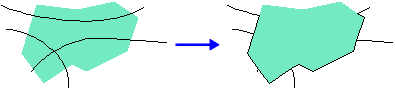
The area is fixed. The edges of the lines are merged with the borders of the area.