Menu | Tools > HIPS and SIPS > Georeference Bathymetry |
Tool |
|
CARIS Batch |
Menu | Tools > HIPS and SIPS > Georeference Bathymetry |
Tool |
|
CARIS Batch |
The default functionality of the Georeference Bathymetry process is to merge the HIPS data from time-based sensor data into processed geographically-referenced depth data. Input data is from one or more track lines. Output is a processed point cloud.
This process converts along track/across track depths in raw data into latitude, longitude, and depth by combining the ship navigation with the horizontal and vertical offsets from the HIPS vessel file. This geographically references the sounding position and depth.
You can change which vessel file the Georeference Bathymetry task uses for certain track lines by selecting them in the Active Track Lines window and changing the Vessel Name in the Properties window. This will invalidate the results of any previous Georeference Bathymetry task you performed on those track lines, so you will need to run it again to see the results of using the new vessel file. |
All other functions for SVC, TPU computation or to apply a vertical adjustment using GPS height or tide from traditional or from zones, are optional.
Interface
These functions are applied using the Georeference Bathymetry dialog box.
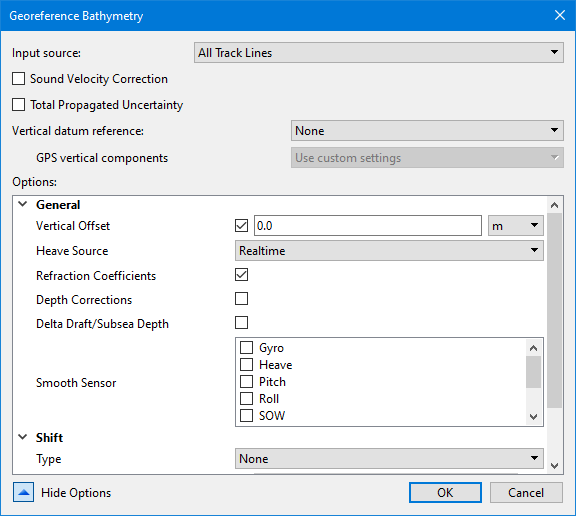
Option | Description |
|---|---|
Input Source | This field displays: • “All Track Lines” if no track lines are selected (this is the default setting) • “Selected Track Lines” if some lines are selected, • names of layers or groups of track lines as selected by user |
Sound Velocity Correction | Enable the check box to apply SVC during Georeference Bathymetry process. This will display SVC options. |
Total Propagated Uncertainty | Enable the check box to apply TPU during Georeference Bathymetry process. This will display TPU options. |
Vertical datum reference | The type of vertical datum to apply to depth values when georeferencing points. The options include: • None: No vertical adjustments are applied. • Tide: A file of observed tidal corrections is applied. • GPS: GPS height values are applied using a model file. Selecting Tide or GPS will cause additional fields to be added to the Options list, specific to each of the datum types. The default is None. |
GPS vertical components | The settings to be used to compute the vertical adjustment values for the GPS heights. This field is only enabled if Vertical datum reference is set to GPS. The options include: • Use default system settings: the adjustments will be computed using default values. • Use custom settings: the adjustments will be computed according to the settings defined in the Custom GPS Vertical Components options. These options are added to the dialog box when the Use custom settings option is selected. |
Show Options | Click the down arrow to display the list of options. When the list is displayed, the label for the button changes to Hide Options. |
Procedure: Georeference all track lines
1. Open data.
2. Select the Georeference Bathymetry command from the Tools menu or HIPS Tools toolbar.
The Georeference Bathymetry dialog box is displayed. If no specific track lines have been selected, the Input source field displays “All Track Lines”.
3. Set options if desired. See Optional settings.
4. Click OK to apply the process.
All track lines in the data set will be georeferenced.
Procedure: Georeference a single line
To georeference a single line:
1. Select the line in the Layers window.
2. Select the Georeference Bathymetry command from the Tools menu or HIPS Tools toolbar.
The Input source field will display “Selected Track Lines” in the Georeference Bathymetry dialog box.
3. Set options if desired. See Optional settings.
4. Click OK to apply the process.
All track lines in the data set will be georeferenced.Continue as procedure for all track lines.
Procedure: Georeference a subset of available lines
To georeference multiple lines from a larger set of lines, use the Group function to select the desired lines.
1. Open data.
2. Select the Group command from the right-click menu in the Layers window.
3. Name the group.
4. Select a track line and drag it into the named group. Repeat with the rest of the track lines to be merged.
5. Select the Georeference Bathymetry command.
6. Select the named group from the Input source drop-down list.
7. Set options if desired. See Optional settings.
8. Click OK to apply the process.
All track lines in the data set will be georeferenced..
 HIPS Tools toolbar