Menu | Create > Areas > From Selection |
Tools |
|
Menu | Create > Areas > From Selection |
Tools |
|
Create a new area or areas using the geometry of one or more existing areas. The original areas are not changed.
This command will not work unless the edges of the original areas are intersected or split. See Intersect Edges. |
If any of the selected areas share a common edge, a single new area is created. If the selected areas are not adjacent, a new area is created for each original area. If any selected areas overlap, no new areas are created.
Related commands:
Procedure
1. Select one or more areas.
2. Intersect the features if they are not intersected.
3. Select the Create Areas From Selection command.
4. Select an acronym and set any necessary attributes as described in Create.
The results will vary depending on the selected areas.
Example 1
In this example, areas A and B have a common boundary. The Create Areas from Selection command would create area C.
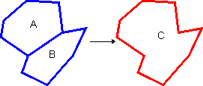
Areas A and B are not changed
Example 2
In this example, five areas are selected. Areas A and B have a common boundary and areas C, D, and E have a common boundary. The result is two new areas, F and G
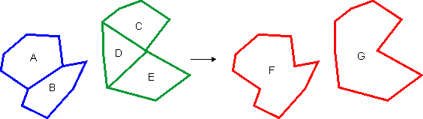
Areas A, B, C, D, and E are not changed
Example 3
In this example, seven areas are selected. Areas A and B have a common boundary. Areas C, D, and E have common boundaries. Areas F and G are completely separate. The result is four new areas, H, I, J, and K.
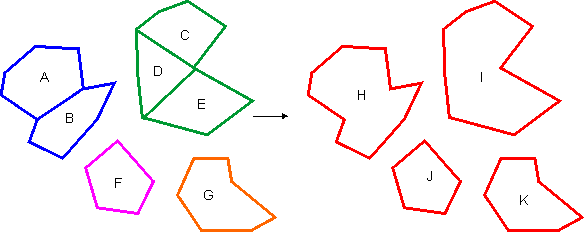
Areas A, B, C, D, E, F, and G are not changed
Example 4
In this example, area A has a hole which is filled by area B. The two areas therefore share a boundary and new area C is created.
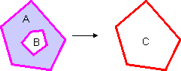
Areas A and B are not changed
Example 5
In this example, area B is on top of area A, which does not have a hole. The two areas overlap and no new area is created.
