Menu | Create > Information Object |
Information objects are objects that can be associated to S-101 features so that additional information can be appended to the feature. Information objects contain attributes but no geometry.
Information object functionality is available only for S-101 products.
Related commands:
Interface
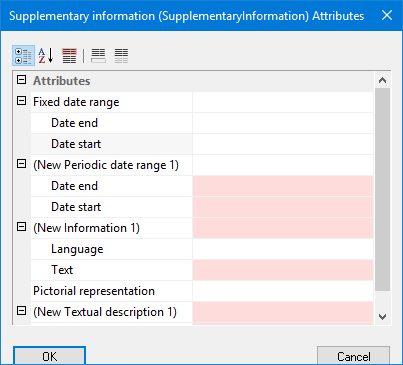
The Create Information Object command uses the following dialog box.
Attributes | Sub-Attributes |
|---|---|
Fixed date range | Single fixed period between the end date and start date. Dates are separated by a comma. • Date end: The latest date in which an feature is present • Date start: The earliest date in which an feature is present. |
Periodic date range | The active period for a seasonal feature determined by the end and start dates. • Date end: The latest date in which an feature is present • Date start: The earliest date in which an feature is present. |
Information | Additional text that cannot be included with standard attributes. • Language that is encoded using an ISO 639-3 character code. • Text string |
Pictorial representation | The file path and full file name, including extension, of the image. Type into field |
Textual description | The file path and full file name, including extension, of a text file that contains additional information about the feature. • File reference: the name of the file • Language that is encoded using an ISO 639-3 character code. |
Procedure
1. Select one or more features in an S-101 product.
2. Select the Create Information Object command.
The Select Object Acronym dialog box is displayed. The type of objects available will depend on the selected feature(s).
3. Select an object acronym.
4. Click OK.
The <object> Information Attributes dialog box is displayed.
5. Set any necessary values and click OK.
The Select Information Objects dialog box is displayed. This displays the information objects that were created.
6. Click Close.
The information objects are now included in the product.