Menu | Tools > Editors > Subset > Filter CZMIL Points |
Toolbar |
|
Menu | Tools > Editors > Subset > Filter CZMIL Points |
Toolbar |
|
The Filter CZMIL Points command in Subset Editor can be used to flag points in a subset as rejected using filter criteria. The filtering is performed according to the noise confidence value assigned to the points in the subset.
The Classify CZMIL Noise process must be run on the points prior to running this command in order to populate the noise confidence value of the points. |
Related commands:
Interface
The Filter CZMIL Points command uses the following dialog box.
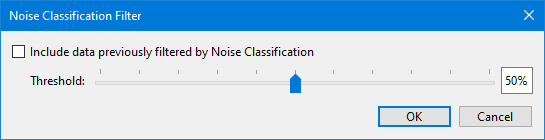
The fields in this dialog box include:
Option | Description |
|---|---|
Threshold | The filter tolerance that will be used to determine whether or not points in the subset will be marked as rejected. Points with a noise confidence value greater than the specified tolerance will be flagged as rejected. 1. Move the slider to the left or right to change the threshold value. |
Include Rejected | Enable this option to include points that have already been filtered out of the dataset based on their noise classification. Previously rejected points that have a noise confidence value less than the specified threshold will have their status reset from rejected. 1. Click the check box to enable this option. |
1. Load a subset into the Subset Editor.
2. Select the Filter CZMIL Points command for Subset Editor.
3. Select the Threshold value.
4. Click OK.
