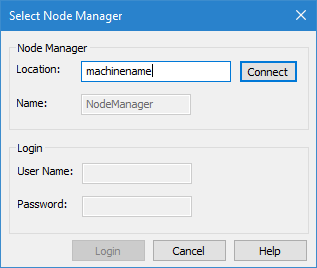
In order to access any of the tools or information, you must be connected to a node manager. The CARIS Bathy DataBASE Node Manager <version> service must be started to connect to a node manager. By default, the service is set to start automatically when you install BDB Server. If your system settings do not allow this or if the service is stopped for updates or other procedures, the service can be started manually using the following procedure.
Start the Node Manager Service
1. Access the Control Panel.
2. Select Administrative Tools.
3. Select Services.
4. Select the CARIS Bathy DataBASE Node Manager <version> service and click the Start command.
5. [Optional] If you have added an update without stopping the service, click the Restart command.
The Node Manager is ready and can now be connected.
Connect to the Node Manager
To connect to a node manager:
1. Select the Select a Node Manager command.
Menu | File > Select a Node Manager |
The Select Node Manager dialog box is displayed.
2. In the Location field, type the name or IP address of the computer on which the Node Manager is installed.
3. Click Connect.
The Node Manager for the selected location is displayed in the Name field and the Login fields are enabled. The default administrator user name and password are dba and sql, respectively. This password should be changed in a production environment. See Add/Edit a User Account for more information.
4. Type a valid User Name.
5. Type the Password for your user account.
6. Click Login.
You are connected to the selected Node Manager.