A database’s catalogue is initially determined by the Pool and Profile properties defined when the database is created. If these properties are not defined, the "BathyObjectPool" and "BathyObjectProfile" environment variables are used by default.
The Upload Catalogue command allows users to replace or update the initial catalogue by uploading a new catalogue to the database. This is useful if attributes or attribute values in the catalogue are changed, or if new values need to be added.
When the command is run, customized pool and profile XML files are applied to the selected database. The uploaded files will be stored within the database on the RDBMS computer.
Ensure there are no database objects being edited when uploading a catalogue. The attribute tables to be updated by the catalogue are locked if a database object is being edited, causing the uploading application (for example, the Administration Tools) to be unresponsive until the edits to the object are complete. |
Changes to the catalogue should be minimal if data has already been added to the database, for example, repairing a typo in the name of an attribute or attribute value. Object and attribute values should not be changed if they have already been assigned to database objects and the data associated with them.
To upload catalogue files:
1. Double-click the Database Properties tool to view the properties tables.
2. Select a database from the Available Databases list.
3. Select the Upload Catalogue command.
Menu | Database > Upload Catalogue |
Pop-up | Available Databases > selected database > Upload Catalogue |
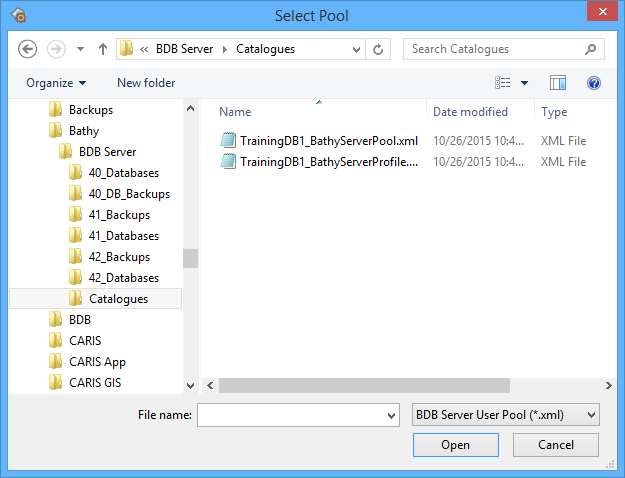
The Select Pool dialog box is displayed.
4. Select the Pool file for the catalogue you want to upload and click Open.
The Select Profile dialog box is displayed.
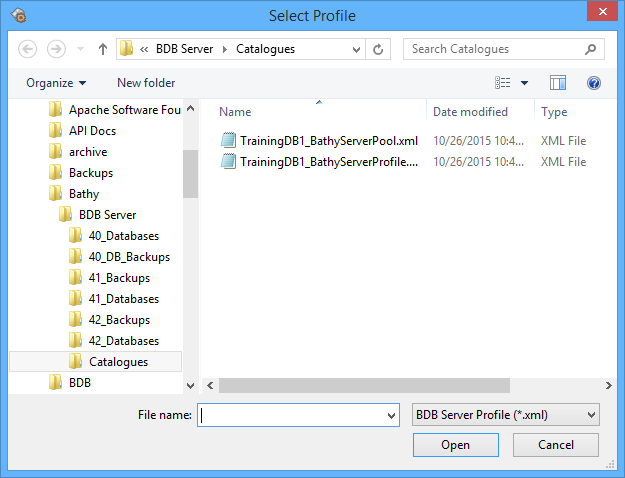
5. Select the Profile file for the catalogue and click Open.
A message is displayed requesting to restart the database. The database must be restarted in order to apply the changes.
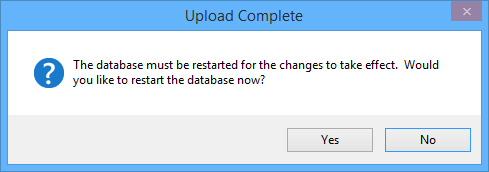
6. Click Yes to restart the database, or click No to restart it manually at a different time.
If you clicked Yes, the message is closed, the database is restarted, and the new catalogue is uploaded and applied to the database. If you clicked No, the message is closed and the catalogue is not updated.