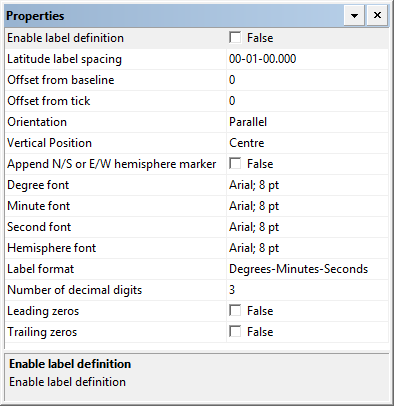
Each tick type has a label that can be defined using the label properties.
Properties
Degree labels | |
|---|---|
Property | Description |
Enable label definition | True: Display degree labels. False: Do not display degree labels. |
Longitude or Latitude label spacing | The interval between the degree labels. This can be latitude or longitude, depending on the graduation type. Type a value. |
Offset from baseline | The distance between the label and the baseline. A positive value moves the label away from the baseline. A negative value moves it closer. Type a value. |
Offset from tick | The distance between the tick and the centre of the label: • A value of zero centres the label over the tick. • A positive value moves the label above longitude ticks and to the left for latitude ticks. • A negative value moves the label below longitude ticks and to the right for latitude ticks. Type a value. |
Orientation | Orientation of the label to the tick mark. Choose from |
Vertical position | Vertical justification of the label relative to the line tick. Choose |
Append N/S or E/W hemisphere marker | True: Include hemisphere markers in labels. False: Do not include hemisphere markers in labels. |
Degree font | The font used for the degree portion of the labels. Click browse (...) and select font settings from a font dialog box. |
Minute font | The font used for the minute portion of the labels. Click browse (...) and select font settings from a font dialog box. |
Second font | The font used for the seconds portion of the labels. Click browse (...) and select font settings from a font dialog box. |
Hemisphere font | The font used for the hemisphere markers. Click browse (...) and select font settings from a font dialog box. |
Label Format | The format for the labels. Choose from: • • • |
Number of decimal digits | The number of decimal places. Type a value. |
Leading zeros | True: Display leading zeros in the labels. False: Do not display leading zeros in the labels. |
Trailing zeros | True: Display trailing zeros in the labels. False: Do not display trailing zeros in the labels. |
Minute and Seconds labels | |
|---|---|
Property | Description |
Enable label definition | True: Display minute labels or second labels. False: Do not display minute and second labels. |
Minutes Interval Seconds Interval | The spacing between the labelled ticks. Type a value. |
Offset from baseline | The distance between the label and the baseline. A positive value moves the label away from the baseline. A negative value moves it closer. Type a value. |
Offset from tick | The distance between the tick and the centre of the label: • A value of zero centres the label over the tick. • A positive value moves the label above longitude ticks and to the left for latitude ticks. • A negative value moves the label below longitude ticks and to the right for latitude ticks. Type a value. |
Font | The font used for the labels. Click browse (...) and select font settings from a font dialog box. |
Orientation | Orientation of the label to the tick mark. Choose from |
Vertical position | Vertical justification of the label relative to the line tick. Choose from |
Leading zeros | True: Display leading zeros in the labels. False: Do not display leading zeros in the labels. |