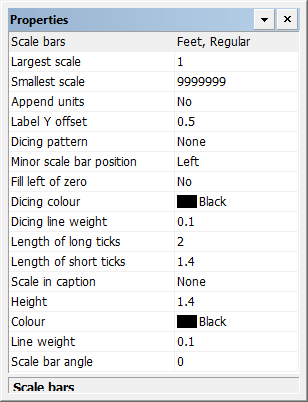
Properties
Property | Description |
|---|---|
Scale bars | Name of the current scale bar type. [Optional] Type a different name. |
Largest scale | The largest scale at which the scale bar will be displayed. Type a value. |
Smallest scale | The smallest scale at which the scale bar will be displayed. Type a value. |
Append units | Yes: Include the units of measurement with the values on the scale bar. No: Do not include the units. |
Label Y offset | The vertical space between the scale bar labels and the scale bar In millimetres at map scale. Type a value. |
Dicing pattern | Dicing is a pattern used to show groups of map distances in the scale bar. Select from |
Minor scale bar position | The side of the scale bar to display the minor scale bar. Select from |
Fill left of zero | The side of zero where the dicing pattern will begin.
Yes: The fill is started on the right of zero. No; The fill is started on the left of zero. |
Dicing colour | The colour for dicing. Click the button and choose a colour from the colour picker. |
Dicing line weight | The thickness of the dicing lines in millimetres at map scale. Type a value. |
Length of long ticks | The length of long ticks in millimetres at map scale. Type a value. |
Length of short ticks | The length of short ticks in millimetres at map scale. This should be the same as the height of the scale bar. Type a value. |
Scaling latitude | The latitude at which panel distortion is minimized. Type a value. |
Scale in caption | The location of the map scale. This is added to the appropriate caption. For more information, see Captions. Select from |
Height | The distance between the top and bottom lines of the scale bar in millimetres at map scale. This should be the same as the length of the short ticks. Type a value. |
Colour | The colour for the top and bottom scale bar lines. Click the button and choose a colour from the colour picker. |
Line weight | The thickness of the scale bar lines in millimetres at map scale. Type a value. |
Scale bar angle | The angle at which the scale bar is displayed. Type a value in degrees. |
