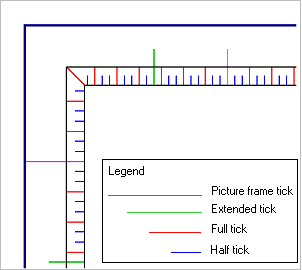
Ticks subdivide the neatline and assist in measuring geographic position on a chart. Tick marks are always straight lines that start on the neatline.
Samples of the available tick types.
Categories of border ticks:
Tick | Description |
|---|---|
Half | Half ticks are the shortest ticks. The spacing of half ticks is less than the spacing of all other ticks. The spacing of all other ticks must be a whole multiple of the spacing of half ticks. |
Full | Full ticks are longer than half ticks and shorter than extended ticks. If neatline frames surround the neatline, the full tick should be long enough to meet the outermost neatline frame. The spacing of full ticks is less than the spacing of extended ticks and greater than the spacing of half ticks. It must be a whole multiple of the spacing of half ticks. |
Extended | Extended ticks are longer than full ticks and shorter than picture frame ticks. Extended ticks start on the neatline and stop before reaching the picture frame. If neatline frames surround the neatline, extended ticks should be long enough to extend beyond the outermost neatline frame. Extended ticks must fall short of any labels that lie between the neatline and the picture frame. The spacing of extended ticks is less than the spacing of picture frame ticks and greater than the spacing of full ticks. The spacing of extended ticks must be a whole multiple of the spacing of full ticks. |
Picture frame | Picture frame ticks are the longest ticks. They extend from the neatline to the picture frame. The spacing of picture frame ticks is greater than any other type of tick and must be a multiple of the spacing of all other ticks. Picture frame ticks are always straight lines, regardless of the distance from the neatline to the picture frame. For this reason, picture frame ticks are not appropriate if the neatline has significant curvature. |
Properties
These properties apply to all border ticks.
Property | Description |
|---|---|
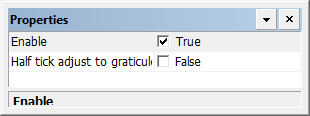
Enable | True: Border ticks are displayed. False: Border ticks are not displayed. |
Half tick adjust to graticule | True: Half ticks are adjusted to match the graticules. See Graticules. False: Half ticks are not adjusted to match graticules. |
Properties: Specific tick types
All tick types have the same properties.
Property | Description |
|---|---|
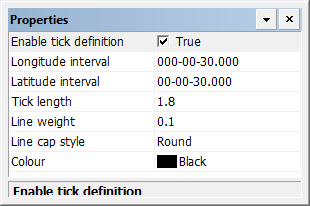
Enable tick definition | True: Display this type of tick mark. False: Do not display this type of tick mark. |
Longitude interval | Interval between ticks on the longitude lines. Type a value. |
Latitude interval | Interval between ticks on the latitude lines. Type a value. |
Extend tick to picture frame | Picture frame ticks only. This becomes active only if the value of the Tick Length property is positive. True: Disregard the Tick Length property and extend the tick to meet the picture frame False: Do not extend ticks. Use the Tick Length property. This is useful for projections like Transverse Mercator where the picture frame might bend. |
Tick length | The length of a tick in millimetres at map scale: A positive value means the tick is outside the neatline. A negative value means the tick is inside the neatline. |
Line weight | The thickness of the tick marks in millimetres at map scale. Type a value. |
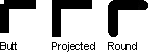
Line cap style | The end style of the lines. Styles are butt, projected, and round. Select from the list. |
Colour | The colour of the tick marks. Click the button and choose a colour from the colour picker. |