
When multiple processes share the same user input parameters or pre-defined values, specific values can be set in advance. Values can be for a single process or they can be shared between processes. They are saved in the model file.
New value
Pop-up | New value |
The New Value command creates a new value object. This is linked to an input connector on the tool it relates to. This value can be shared with other processes.
A value object looks something like this:
New parameter
Pop-up | New parameter |
If a process requires specific input when the model file is run, the New Parameter command creates a parameter object.
A parameter object looks something like this:
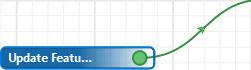
When the process model file is run, the parameter is displayed as a field in the Run dialog box. This will prompt the user to identify or point to the required input. A single parameter may be shared between processes. Parameters can also be used as output prompts.
Properties
Fields in the Properties window for each process, parameter or value are set to default values. If a setting is changed from the default, the status indicator box for the field changes to grey.
Defaults can be restored by clicking on the indicator box and selecting Reset.