| Description | Example |
|---|---|---|
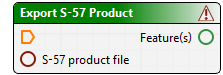
Tool | Tool is an general term for all items in a model. A tool listed in the Tool window can be a: • Process: A specific tool applied to data. For example, Export S‑57 Product. • Function: A tool such as Exists, which verifies that a specific data set exists. Tools display validation icons. | Sample tool:
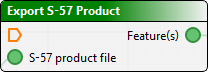
The red triangle with the exclamation point at the right of the title bar indicates that the process is incomplete or that parameters are not fully defined. Red circles indicate where mandatory parameters must be linked. Parameters that are defined are green-filled. Hollow green circles indicate optional parameters. |
Connection (port) | A linkage point on a tool. A port links data to a particular parameter of a process, for example, input, output, condition and options. • An Input port is used for data to which the process is applied, for example, the Track Lines(s) port points to the location of the data. • Output is what is produced by the process, for example, a CSAR surface. Process tools only have one output port. |
|
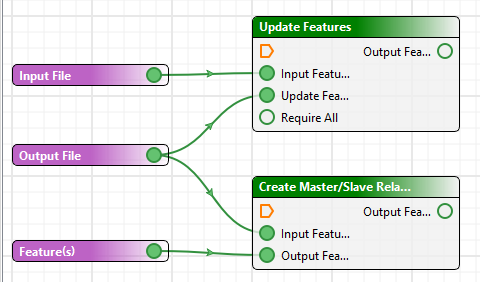
Connector | A line drawn from tool to tool to show how one function connects to the other. Connectors will not attach Input to Input or Output to output. | For example, a line from an output port labelled Track Line(s) to a Coverage input port which indicates the output data will contribute to the coverage. |
Model | A group of tools and their associated properties, linked in such a way to perform a task or a series of tasks in a workflow, which is saved as a *.processmodel file.
| |
Parameter | Use a parameter to set the requirement for a specific input value, to be set at the time the process model file is run. When the model file is run the Run dialog box will display a field so the user can identify the required input. This enables the process model file to be applied to different datasets. Users will be prompted to supply the required information when the model is run. | For example, setting location of specific files at run time See also Values and Parameters. |
Value | Set a specific value that will allow the process model file to run if a specific condition is met. If met, the processing will continue. | This value can be shared with other processes. |
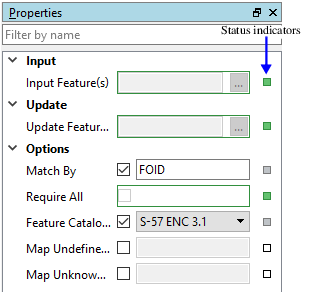
Properties Status Indicators | A status indicator is a small box to the right of each property. The colour of the box means the following: • White: Default value • Grey: A value has been set or the default value has changed. • Red: Mandatory. A value must be set for this field. • Green: Display the property name as an input to the process. Click on the indicator box and select Reset to restore defaults. |
|