 CARIS HPD Paper Chart Editor
 CARIS HPD Paper Chart Editor
CARIS HPD Product Editor
CARIS HPD Source Editor
CARIS S-57 Composer
CARIS Paper Chart Composer
Menu | Select > Features By > Coordinate Buffer |
Select all features within a specific circular buffer around a given coordinate.
Related commands:
• • • • • • • • • • • • | • • • • • • • • • • • • |
Interface
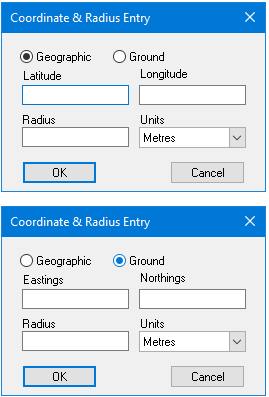
Option | Description |
|---|---|
Format | Geographic: Centre using latitude and longitude. Ground: Centre using eastings and northings. |
Coordinates | Latitude/Longitude: Geographic coordinate values Eastings/Northings: Ground coordinate values. |
Radius | The size of the area around the coordinates. Radius: The radius value. Units: The units for the radius. Select |
Procedure
1. Select the Select by Coordinate Buffer command.
The Coordinate & Radius Entry dialog box is displayed.
2. Select Geographic or Ground.
3. Type values in the coordinate fields.
4. Type a value for the Radius.
5. Select Metres or Nautical Miles from the Units list.
6. Click OK.
All features within the specified radius are selected.