 CARIS HPD Product Editor
 CARIS HPD Product Editor
CARIS HPD Source Editor
Menu | Select > Markers |
Tool |
|
Select markers by defining a filter. A filter consists of one or more clauses that markers must match to be selected.
Related commands:
• • • • • • • • • • • • • • • • • • • • | • • • • • • • • • • • • • • • • • • • • |
Interface
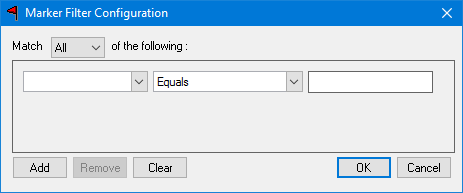
Option | Description | |
|---|---|---|
Match | Choose from: • • | |
Filter | A filter is a clause or a series of clauses. Build a clause as follows: 1. Select an attribute from the first list. 2. Select an operator from the second list. 3. Select or type a value from the third list. The value you enter and how you select it depends on the attribute type. 4. Click Add. The clause is added to the list. | Attributes can be: • Marker ID • Type • Status • Timestamp • Owner • Text • Usage Operators can be: • Equals • Not Equal To • Newer Than • Older Than |
Buttons | Command buttons are: • Add: Adds a newly built clause to the list of clauses. • Remove: Removes the selected clause from the list of clauses. • Clear: Clears all clauses. | |
Procedure
1. Select the Markers layer.
2. Select the Select Markers command.
The Marker Filter Configuration dialog box is displayed.
3. Build a filter.
4. Click OK.
Any markers that match the filter are selected.
