Atlas is a book management tool that assembles database charts and other files into publications for distribution.
Atlas functionality is available only if the Publications Module is active. Contact CARIS support for more information. |
For example, a small-craft chart booklet might be compiled in Atlas by adding database charts along with external files from third-party applications, such as Microsoft Word.
The charts are exported as PDF or TIFF files. These files, along with the external files, can be opened in a desktop publishing application for final compilation into a finished book.
Atlas can be used to accomplish the following tasks related to assembling chart books:
• Create a book for adding charts
• Add a new page for each chart that is included in the book
• Add a cover page
• Insert pages and move pages up or down
• Update pages dynamically as pages are added or removed
• Export the pages to a specified folder
• Publish a chart book to set a publication date and close the book to further editing.
An XML file is also exported along with the pages. This file can be combined with an XSLT file in third-party software to automate the compilation of the final book.
Alternatively, an Atlas book can be created and exported using CARIS processes in a batch file. See CARIS® Batch for more information.
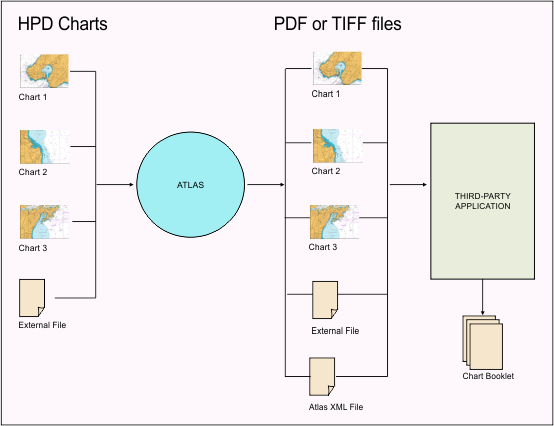
Below is a simple Atlas workflow.
In this example, the Atlas contains three database charts (Chart 1, Chart 2, and Chart 3) along with an external file. The external file can be a title page, an image, or some other component that was created in a third-party application.
When the charts and files are processed through Atlas, three PDF or TIFF files are created and saved in a selected folder. The external file is also copied to the same folder.
When the charts and files are exported, an XML file is also created and saved to the folder. The XML file can be used with an XSL transformations style sheet in the application to assist with this process.
All exported files can be opened in a third-party desktop publishing application for final compilation into a finished book.
Related commands:
• • • • | • • • |