CARIS HPD Paper Chart Editor
 CARIS HPD Paper Chart Editor
CARIS HPD Product Editor
CARIS HPD Source Editor
CARIS S-57 Composer
CARIS Paper Chart Composer
Pop-up | Edit Line > Split (Display window) |
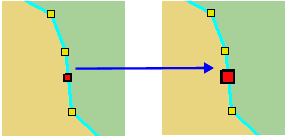
Split an edge at a selected vertex. The original feature remains intact but two new edges are created.
The original unsplit line is moved to the Deleted Features layer and must be certified as Deleted to remove it.
Related commands:
• • • • • • • • • • | • • • • • • • • • |
Procedure
1. Select the feature.
2. Select the Edit Mode command.
3. Select the vertex where the edge is to be split.
4. Select the Split Edges command.
The edge is split.