 CARIS HPD Publications Module
 CARIS HPD Publications Module
Menu | Catalogue > Publish |
Tool |
|
Pop-up | Publish (Object Browser) |
Create an instance of a catalogue that can be applied to publications.
When a catalogue is published, it is set to read-only and cannot be modified. However, a copy of the catalogue is created during the publishing process. This copy can be opened and modified.
For example, if you publish Version 1 of a catalogue you are prompted for the next version number (2). Version 2 is an exact copy of Version 1 which is now published and set to read-only. Version 2 is active and can be applied to a new publication.
Related commands:
• • • • • | • • • • • |
Interface
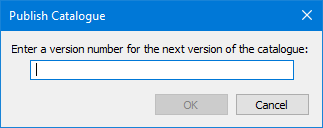
Option | Description |
|---|---|
Version number | Version number for the catalogue that is created from the published one. This version is the catalogue that can be opened and modified. Type a value. |
Procedure
1. Select the catalogue.
2. Select the Publish Catalogue command.
The Publish Catalogue dialog box is displayed.
3. Type a version number
4. Click OK.
The publishing process is started.
Any warnings that were not corrected when the catalogue was validated are listed in the Output window. A message will inform you that there are warnings and prompt if you want to continue.
5. Click Yes to continue or No to cancel.
Another message prompts if you want to set this catalogue as active. An active catalogue can be applied to a new publication.
6. Click Yes to publish the catalogue.
The catalogue is published.
