 CARIS HPD Publications Module
 CARIS HPD Publications Module
Menu | Edit > Add |
Tool |
|
Pop-up | Add (Object Browser) |
Add attributes to a publications catalogue.
For more information on attributes, see Attributes.
Related commands
• • • • • | • • • • • |
Procedure
1. Make sure a catalogue is open in Publications Module.
2. Select the Attributes layer in the Object Browser.
3. Select the Add command.
The Attributes dialog box is displayed.
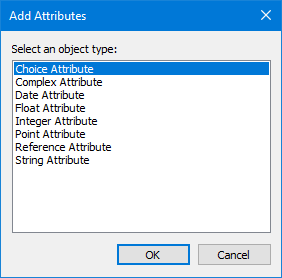
4. Select an attribute type
5. Click OK.
The attribute is listed in the Object Browser.
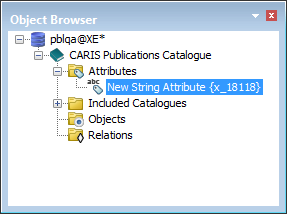
The properties of the attribute are displayed in the Properties window. Some properties are dependant on the attribute type.
6. Complete the following values in the Properties window.
Property | Attribute Type | Description |
|---|---|---|
General | ||
Type | All | Type of attribute. This value is read-only |
ID | All | Internal identifier. This value is read-only |
Attributes | ||
Code | All | This is name of the attribute that is used as an XML tag. The following rules apply to this field: • Names can contain alphanumeric characters • Names cannot start with a number or punctuation character • Names cannot start with "xml" • Names cannot contain spaces (use the underscore character to represent a space) |
Name | All | This is the name that is displayed in the Object Browser. The name can contain spaces. |
Remarks | All | Text that describes the attribute. |
Values | Choice | Values that can be chosen from the attribute. These are can be listed in a linear manner as Value 1, Value 2 etc. Values can also be organized in a hierarchical tree structure. This can be done by inserting a backslash in between values. For example, Value 1 can be written as The above configuration means that MyLocation is located in MyRegion of MyCountry. |
Control Type | Choice | Choose from two types: • DEFAULT is a list in the order that values are entered. • TREE is hierarchical structure as shown above |
Control Type | String | Choose from four types: • DEFAULT: Text that is manually entered. • FILENAME: Path and name of a file available on a computer. • FILE: Name of a file stored in the database. • HTML: Text with HTML formatting capabilities. |
Maximum number of decimal digits | Float | Number of digits behind the decimal point. |
The Object Browser is refreshed to display the attribute as renamed to the value in the Name field
