 CARIS HPD Paper Chart Editor
 CARIS HPD Paper Chart Editor
CARIS HPD Product Editor
CARIS HPD Source Editor
CARIS S-57 Composer
CARIS Paper Chart Composer
Key | <I> |
Intersect one feature with another line or area feature. You can use this command when adding new features or when editing existing features.
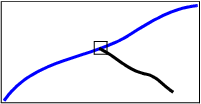
Intersecting splits the edges of both features. The lines themselves are not split, but a node is inserted at the vertices, thus splitting the edge into two.
In this example, the blue line is the existing line. It is split when the vertex of the black line is added.
Intersecting will not work if the feature you are intersecting with is locked by another user. |
Intersecting use the following symbols to indicate the kind of vertex you are intersecting with:
Snap/ to/Intersect with | Symbol |
|---|---|
Start node of an edge |
|
End node of an edge |
|
Intermediate edge vertex |
|
Nearest edge vertices |
|
Vertex |
|
Point or sounding |
|
To cycle through multiple vertices in close proximity, press <Space> several times until the desired vertex is highlighted.
Related commands:
• • | • |
Procedure: New feature
1. Start to create a new line or area feature.
2. After you enter the point you want to intersect, press and hold <I>.
3. Press and hold the mouse button and drag the point to the feature you want to intersect with.
4. Release the mouse button when the vertex you want is highlighted.
Procedure: Existing feature
1. Select the Edit Mode command.
2. Select the line or area feature that you want to intersect.
3. Press and hold the mouse button and drag a point to the feature you want to intersect with.
4. Release the mouse button when the vertex you want is highlighted.


