Menu | Tools > Set CARIS Mira AI Account Credentials |
The Set CARIS Mira AI Account Credentials command is used to define the account credentials that will be used to connect to the CARIS Mira AI. This is needed when running a process model containing a process that connects to the CARIS Mira AI, such as the Classify HIPS Noise process. The application will automatically check for credentials in this location any time a connection attempt is made.
This command can only be run when the application has been started using the Run as administrator command, available by right-clicking the application shortcut. |
Users connecting to the CARIS Mira AI are required to register with the service prior to connecting. If you have not created an account, you must do so before credentials can be entered through this command.
Once entered, these credentials will be remembered on this computer for all subsequent uses, for both the current active user account and the default local system account. This allows the credentials to be used when running the Onboard Service from either previously mentioned account to run a process that requires the credentials.
The Credential Management setting in Tools > Options is ignored by this command. |
If a user wants to run the service using a different CARIS Mira AI account, this command must be run again using the new credentials. The new credentials will then be used as the stored credentials on the computer. If the credentials need to be removed, the Unset CARIS Mira AI Account Credentials command must be used. See Unset CARIS Mira AI Account Credentials for more information.
The connection to the CARIS Mira AI can be made either in the cloud or in an on-premises network server. The type of connection used is controlled by the CARIS Mira AI Connection setting in Tools > Options. See CARIS Mira AI Connection 105for more information on this setting.
Interface
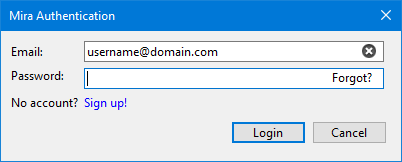
The Set CARIS Mira AI Account Credentials command uses the following dialog box.
Option | Description |
|---|---|
The email address associated with the CARIS Mira AI user account. | |
Password | The password for the user account. |
Forgot? | This link can be used to reset the password for the user account if needed. When clicked, you will be taken to the CARIS Mira AI web site where you will be asked to provide the email address for the user account and will then be provided with an activation code via email. You can then use this code to create a new password. |
Sign up! | This link can be used to create a new user account. When clicked, you will be taken to the CARIS Mira AI web site where you can enter the settings for the user account. |
Procedure
1. Select the Set CARIS Mira AI Account Credentials command.
The CARIS Mira AI Authentication dialog box is displayed.
2. Enter the Email and Password for the CARIS Mira AI user account.
3. Click Login.
The credentials are saved.