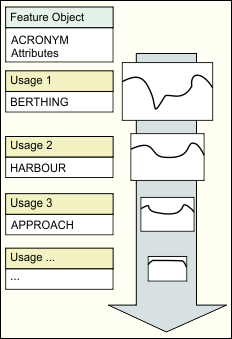
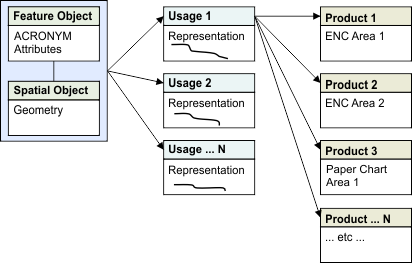
An HPD source database maintains a single set of data that can be used for all products types — features are stored only once and there are no redundant or duplicate objects. Multiple representations of the feature can be created for use in different products. Object attributes are updated once even if the object is used in several products.
All HPD product editors derive products from the same source database. Updates to source are carried automatically to multiple products. Product-specific features and customizations can be made without affecting the source features.
Multiple representations are useful when a source object is reproduced differently for various products. For example, a line feature can be represented differently in various products because of scale. Representation in a small-scale chart needs, for example, to be generalized more than a representation in a large-scale chart.
The source object is not copied, meaning that all maintenance and update of the object is done at the original source level and attribute updates are reflected in the individual representations.
Representation of an object is consistent across products (scale, geographic coverage, and so on). For organizations producing multiple products (for example, S-57 ENCs and paper charts), a workflow based on product usage can be established to allow easy updates of multiple product types and overlapping products (for example, paper charts).
Hierarchy of usages
Usages must be set up in a hierarchy. Typically, this hierarchy is determined by scale ranges. In a few cases, levels may overlap.
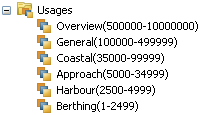
The hierarchy does not have to be based on scale ranges. For example, some organizations may use some usages for storing source data that is not determined by scale, and other usages for creating product data based on scale. In this case, the scale-less source usages would be placed below the scale-based product usages in the hierarchy.

The hierarchical order of usages affects the way usages and representations are processed.
Representations on multiple usages
You can store multiple representations of an object in usages (for example, coastal, harbour, overview, approach), where each usage represents a particular scale range and provides a certain amount of detail depending on the scale.
The following example shows how a single object can be represented on multiple usages.
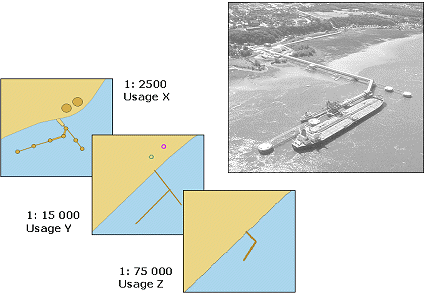
The best instance of a feature is stored on the base usage. This is determined by the usage order in the Usage Manager. See the Database Administration Guide for more information.
Representations on smaller scales are derived or copied from the base usage. These relationships are maintained in the database. If you change the base object, all its derivatives are flagged with a Modified note, added in the Representations window, indicating that the base has changed.
If you change any features that are not base, then only its derivatives (generalizations), if any, are flagged.
Related commands
• • • • | • • • • |